
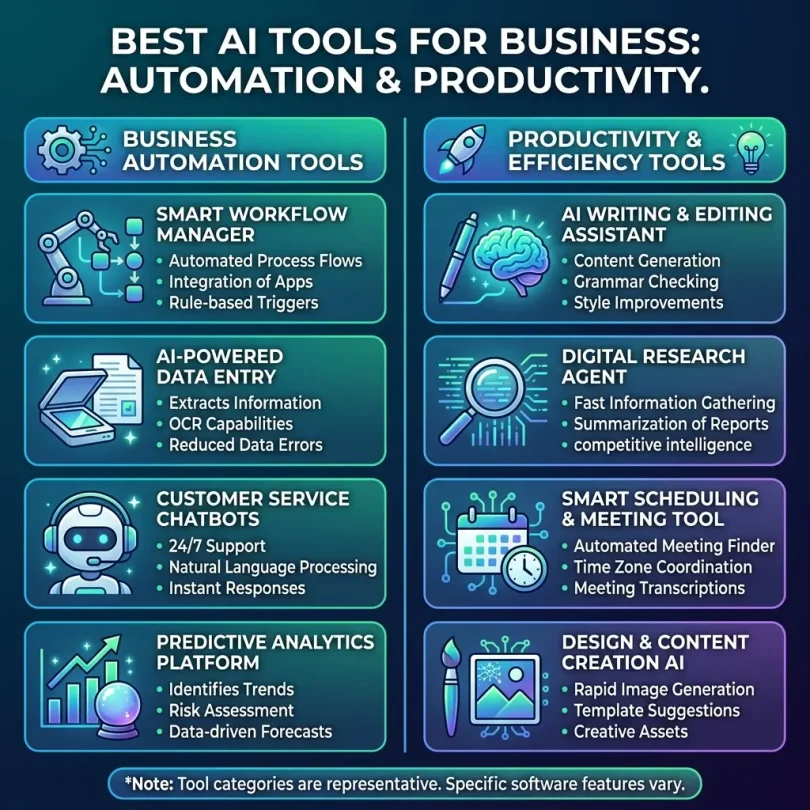

AI tools are changing the way businesses work. A few years ago, artificial intelligence felt like something only large technology companies could use. Today, small businesses, agencies, startups, ecommerce brands, consultants, marketing teams, sales teams, customer support departments, accountants, recruiters, and remote teams can use AI software to save time, reduce manual work, improve decisions, and increase productivity.
The best AI tools for business automation can help with writing emails, creating reports, summarizing meetings, generating marketing content, analyzing data, managing customer support, automating workflows, qualifying leads, building chatbots, improving project management, and organizing daily tasks.
But the AI software market is crowded. New AI apps appear every week, and many tools make big promises. Some are useful for real business workflows, while others are only interesting demos. A business should not buy an AI tool only because it sounds modern. The right AI tool should solve a real problem, connect with your existing apps, protect business data, and deliver measurable time savings.
This guide compares the best AI tools for business automation and productivity, explains the most important use cases, and helps you choose the right AI software for your team.
Important note: This article is for general business technology guidance. AI tools, pricing, privacy policies, data usage terms, model features, integrations, and enterprise controls can change quickly. Always review the latest vendor terms, security documentation, and pricing before using any AI tool with sensitive business data.
Quick Answer: What Are the Best AI Tools for Business Automation?
The best AI tools for business automation depend on your workflow. ChatGPT, Microsoft Copilot, Google Gemini, Claude, Notion AI, Zapier, Make, Grammarly, Jasper, Canva AI, Fireflies.ai, Otter.ai, Gong, HubSpot AI, Salesforce Einstein, Zendesk AI, Intercom Fin, ClickUp AI, Asana AI, and Tableau AI are some of the most useful tools for business productivity and automation.
For most businesses, the best starting point is not one AI tool. It is an AI stack: one AI assistant for general work, one automation platform for workflows, one meeting assistant, one writing or marketing tool, one customer support AI tool, and AI features inside your CRM, project management, analytics, or help desk software.
Best AI Tools for Business Automation and Productivity: Comparison Table
| AI Tool | Best For | Main Strength | Good Fit For |
|---|---|---|---|
| ChatGPT | General business productivity | Writing, brainstorming, research support, analysis, automation ideas | Teams needing a flexible AI assistant |
| Microsoft Copilot | Microsoft 365 productivity | AI inside Word, Excel, Outlook, Teams and Microsoft apps | Businesses already using Microsoft 365 |
| Google Gemini for Workspace | Google Workspace productivity | AI inside Gmail, Docs, Sheets, Slides and Meet | Teams using Google Workspace |
| Claude | Long-form writing and document analysis | Drafting, summarizing, reasoning and reviewing long content | Teams working with documents and research |
| Zapier | No-code workflow automation | Connecting apps and automating business tasks | Small businesses using many SaaS tools |
| Make | Visual workflow automation | Advanced automation scenarios and app connections | Teams needing flexible automation flows |
| Notion AI | Knowledge management | Notes, docs, summaries, project knowledge and internal wikis | Teams using Notion for operations |
| Grammarly | Business writing improvement | Grammar, tone, clarity and brand communication | Teams writing emails, docs and customer messages |
| Jasper | Marketing content | Campaign copy, brand voice, content workflows | Marketing teams and agencies |
| Canva AI | Business design productivity | Social graphics, presentations, brand content and visual assets | Small teams without full-time designers |
| Fireflies.ai | Meeting notes | Call recording, transcription, summaries and action items | Sales, support and remote teams |
| Otter.ai | Meeting transcription | Live notes, meeting summaries and searchable transcripts | Teams with frequent meetings |
| HubSpot AI | Sales and marketing automation | CRM content, emails, reporting and customer workflows | Businesses using HubSpot CRM |
| Salesforce Einstein | CRM intelligence | Sales insights, automation, predictions and customer data AI | Growing sales teams using Salesforce |
| Zendesk AI | Customer support automation | Ticket routing, agent assistance and support automation | Support teams and service businesses |
| Intercom Fin | AI customer support chatbot | Automated answers and customer service workflows | SaaS, ecommerce and online businesses |
| ClickUp AI | Project management productivity | Task summaries, docs, planning and team workflows | Teams managing projects and tasks |
| Asana AI | Work management | Project updates, smart summaries and workflow planning | Operations, marketing and project teams |
Why Businesses Are Using AI Tools in 2026
Businesses are adopting AI tools because teams are expected to do more work with fewer resources. Salespeople need to respond faster. Marketers need more content. Customer support teams need shorter response times. Managers need better reporting. Remote teams need clearer communication. Founders need to automate repetitive tasks without hiring for every role.
AI tools can help by reducing low-value manual work. For example, an AI meeting assistant can summarize a client call. An AI writing tool can draft a follow-up email. A workflow automation platform can move a lead from a form into a CRM. An AI support chatbot can answer common customer questions. An AI analytics tool can help explain business data in plain language.
The biggest benefit is not only speed. The real benefit is operational consistency. AI tools can help teams follow processes, respond on time, capture notes, organize information, and reduce human error.
Best Business Use Cases for AI Tools
1. Email Writing and Communication
AI tools can help write professional emails, summarize long threads, improve tone, create customer responses, prepare proposals, and turn rough notes into clear messages. This is useful for sales teams, support teams, recruiters, managers, and business owners.
2. Meeting Summaries and Action Items
AI meeting assistants can record calls, transcribe conversations, summarize key points, and list action items. This helps teams avoid missing important details after sales calls, client meetings, interviews, support escalations, and internal planning sessions.
3. Sales Automation
AI can help qualify leads, draft outreach emails, summarize CRM activity, recommend next steps, forecast pipeline, and analyze customer conversations. Sales teams can use AI to reduce admin work and focus more time on selling.
4. Marketing Content Creation
AI tools can support blog outlines, ad copy, landing page ideas, product descriptions, email campaigns, social captions, video scripts, and content repurposing. The best results come when humans review, edit, fact-check, and add brand expertise.
5. Customer Support Automation
AI support tools can answer common questions, suggest replies to agents, categorize tickets, detect urgency, route requests, and help customers find solutions faster. This can reduce support workload and improve customer experience.
6. Workflow Automation
AI-powered automation tools can connect apps and automate routine processes. For example, when a customer fills a form, the system can create a CRM lead, send a welcome email, notify the sales team, create a task, and add the contact to a marketing list.
7. Data Analysis and Reporting
AI tools can help turn business data into summaries, charts, explanations, and insights. Instead of manually checking spreadsheets, managers can ask questions about sales performance, customer trends, marketing campaigns, or operational bottlenecks.
8. Knowledge Management
AI can summarize documents, organize internal wikis, answer questions from company knowledge bases, and help employees find information faster. This is especially useful for remote teams and growing companies.
9. Project Management
AI project management features can summarize tasks, create project plans, generate status updates, identify blockers, and help teams prioritize work. This improves visibility and reduces repetitive project admin.
10. Design and Presentation Creation
AI design tools can help create presentations, social graphics, brand assets, simple videos, product visuals, and marketing materials. This is useful for small teams that do not have full-time designers.
What to Look for in AI Tools for Business
1. Real Business Use Case
Before buying an AI tool, ask what problem it solves. Does it reduce manual work? Improve response time? Help sales? Improve customer support? Make reporting faster? If the tool is interesting but does not solve a clear business problem, it may become another unused subscription.
2. Data Privacy and Security
Businesses should be careful when entering sensitive data into AI tools. Review whether the vendor uses your data for training, how data is stored, whether admin controls are available, and whether the platform supports enterprise security features.
3. Integrations
An AI tool becomes more valuable when it connects with your existing apps. Check integrations with Gmail, Outlook, Microsoft 365, Google Workspace, Slack, Teams, Salesforce, HubSpot, Shopify, WordPress, QuickBooks, Notion, Asana, ClickUp, Zendesk, Intercom, Zapier, and Make.
4. Ease of Use
The best AI tool is one your team can use without heavy training. If setup is too difficult, employees may return to old habits. Look for clean interfaces, helpful templates, simple workflows, and good onboarding.
5. Customization
Good business AI tools should adapt to your brand voice, workflow, documents, customer data, or internal knowledge. Generic AI output is less valuable than customized output based on your business context.
6. Human Review Controls
AI should assist, not blindly replace judgment. For important business communication, legal content, medical content, financial topics, cybersecurity guidance, hiring decisions, and customer issues, human review is essential.
7. Pricing and Usage Limits
AI pricing can depend on users, seats, credits, tokens, documents, automations, minutes, workflows, chat volume, or enterprise features. Always check limits before relying on a tool for daily operations.
8. Scalability
A tool that works for one person may not work for a 20-person team. Check whether the platform supports team accounts, permissions, admin controls, shared templates, audit logs, and centralized billing.
Best AI Tools for Business Automation and Productivity: Detailed Reviews
1. ChatGPT
Best for: General business productivity and flexible AI assistance
ChatGPT is one of the most flexible AI tools for business productivity. It can help with writing, brainstorming, summarizing, planning, research support, spreadsheet logic, customer reply drafts, content outlines, process documentation, training material, code explanation, data interpretation, and automation ideas.
For small businesses, ChatGPT can act like a general-purpose productivity assistant. A founder can use it to draft a proposal. A marketer can use it to create campaign ideas. A sales team can use it to improve outreach messages. A support manager can use it to write help center articles. An operations manager can use it to document standard operating procedures.
The biggest strength of ChatGPT is flexibility. Instead of being limited to one narrow workflow, it can support many daily business tasks. However, businesses should still review outputs, fact-check important information, and avoid entering sensitive data unless they understand the privacy settings and business plan controls.
Key Features
- Writing and editing assistance
- Business planning and brainstorming
- Document summarization
- Data and spreadsheet reasoning support
- Customer response drafting
- Content and marketing ideas
- Workflow and automation planning
- Custom AI assistant possibilities depending on plan
Pros
- Very flexible for many business tasks
- Useful for teams of all sizes
- Can improve writing speed and clarity
- Good for brainstorming and process improvement
- Can support technical and non-technical users
Cons
- Outputs still need human review
- May provide outdated or incomplete information without verification
- Data privacy settings should be reviewed before business use
- Not a full workflow automation platform by itself
Best Use Case
Choose ChatGPT if your business needs a flexible AI assistant for writing, planning, summarizing, analysis, brainstorming, and general productivity.
2. Microsoft Copilot
Best for: Businesses using Microsoft 365
Microsoft Copilot is designed for teams that already use Microsoft 365 apps such as Word, Excel, Outlook, PowerPoint, Teams, SharePoint, and OneDrive. Its main value is that it brings AI into the tools many businesses already use every day.
Copilot can help summarize emails, draft documents, generate presentation outlines, analyze spreadsheet data, recap Teams meetings, and find information across Microsoft workspaces. This makes it especially useful for companies that live inside the Microsoft ecosystem.
For business productivity, Microsoft Copilot can reduce time spent on email, meeting notes, document drafting, and internal information search. It can be especially valuable for managers, sales teams, finance teams, HR teams, and knowledge workers.
Key Features
- AI assistance inside Microsoft 365 apps
- Email drafting and summarization in Outlook
- Meeting summaries in Teams
- Document creation in Word
- Spreadsheet support in Excel
- Presentation support in PowerPoint
- Enterprise security and admin controls depending on plan
Pros
- Excellent fit for Microsoft 365 users
- Works inside familiar business apps
- Useful for meetings, email and documents
- Can improve productivity across departments
- Strong enterprise ecosystem
Cons
- Best value requires Microsoft 365 usage
- May be costly for larger teams
- Feature availability can depend on plan and region
- Teams still need good file organization and permissions
Best Use Case
Choose Microsoft Copilot if your business already uses Microsoft 365 and wants AI assistance inside Outlook, Teams, Word, Excel, PowerPoint and SharePoint.
3. Google Gemini for Workspace
Best for: Businesses using Google Workspace
Google Gemini for Workspace is useful for teams that work in Gmail, Google Docs, Google Sheets, Google Slides, Google Drive, and Google Meet. It brings AI support into the Google productivity environment, helping with emails, documents, spreadsheets, presentations, and meetings.
For small businesses using Google Workspace, Gemini can help draft emails, summarize threads, create document drafts, generate presentation ideas, organize spreadsheet information, and support meeting productivity.
It is especially useful for remote teams, agencies, startups, education providers, ecommerce teams, and companies that already rely heavily on Google tools.
Key Features
- AI support in Gmail
- Document drafting in Google Docs
- Spreadsheet assistance in Google Sheets
- Presentation support in Google Slides
- Meeting support in Google Meet
- Workspace data context depending on permissions
- Team productivity features
Pros
- Strong fit for Google Workspace users
- Works inside familiar apps
- Useful for email, docs and meetings
- Good for collaborative teams
- Can reduce routine writing and summarization work
Cons
- Best value depends on Google Workspace usage
- May not replace specialized AI tools
- Businesses must manage permissions carefully
- Output still needs review
Best Use Case
Choose Google Gemini for Workspace if your team uses Gmail, Docs, Sheets, Slides, Drive and Meet as the core of daily business operations.
4. Claude
Best for: Long-form writing, document review and thoughtful analysis
Claude is an AI assistant that is often useful for long-form writing, document analysis, summarization, editing, brainstorming, and structured reasoning. Businesses can use it to review reports, summarize policies, draft documents, prepare outlines, analyze long text, and improve communication.
For teams that work with long documents, client briefs, proposals, legal-style drafts, research notes, training materials, or internal policies, Claude can be a valuable productivity tool.
Key Features
- Long document summarization
- Drafting and editing support
- Business communication improvement
- Research note organization
- Policy and report review
- Structured brainstorming
Pros
- Good for long-form content and documents
- Useful writing quality
- Strong summarization ability
- Helpful for knowledge work
- Can support teams that process lots of text
Cons
- Not a full automation platform
- Requires human review for accuracy
- Data policy and plan terms should be reviewed
- May need other tools for workflow integrations
Best Use Case
Choose Claude if your business needs AI help with long documents, summaries, reports, writing, research notes and internal knowledge work.
5. Zapier
Best for: No-code workflow automation
Zapier is one of the most popular workflow automation platforms for small businesses. It connects apps and automates tasks without requiring custom code. With AI features and app integrations, Zapier can help teams automate repetitive processes across sales, marketing, support, operations, HR, finance, and ecommerce.
For example, a business can use Zapier to send website form leads into HubSpot, create a Slack notification, add the contact to an email list, create a follow-up task, and update a Google Sheet. This kind of automation can save hours of manual work each week.
Key Features
- No-code app automation
- Thousands of app integrations
- AI-assisted automation building
- Multi-step workflows
- Lead routing and notifications
- Data movement between business apps
- Automation templates
Pros
- Excellent for connecting SaaS tools
- No coding required
- Useful for small business automation
- Large integration library
- Can automate repetitive admin work
Cons
- Costs can rise with task volume
- Complex workflows need careful testing
- Broken integrations can interrupt processes
- Not ideal for every advanced backend workflow
Best Use Case
Choose Zapier if your business uses multiple SaaS tools and wants to automate repetitive workflows without hiring a developer.
6. Make
Best for: Visual and flexible workflow automation
Make is a visual automation platform that lets businesses create advanced workflows between apps. It is often useful for teams that want more control over automation scenarios, logic, routing, and data transformation.
Make can automate lead management, order processing, reporting, social posting, email workflows, CRM updates, file handling, notifications, and internal operations. Its visual workflow builder makes it easier to understand complex automations compared with text-only setups.
Key Features
- Visual automation builder
- App integrations
- Advanced workflow scenarios
- Data routing and transformation
- Scheduled automations
- Conditional logic
- Operations monitoring
Pros
- Flexible automation design
- Good for complex workflows
- Visual interface helps with logic
- Useful for operations teams
- Can reduce manual data entry
Cons
- Learning curve can be higher than simple automation tools
- Workflows need testing and monitoring
- Pricing depends on operations usage
- Non-technical users may need setup help
Best Use Case
Choose Make if your business needs flexible, visual workflow automation across multiple apps and wants more control over automation logic.
7. Notion AI
Best for: Knowledge management and internal documentation
Notion AI is useful for teams that use Notion for notes, documents, project planning, internal wikis, SOPs, content calendars, meeting notes, and company knowledge. It can summarize pages, draft content, rewrite notes, answer questions, and help organize information.
For businesses that struggle with scattered knowledge, Notion AI can help employees find information faster and turn rough notes into usable documentation.
Key Features
- AI writing inside Notion
- Page summaries
- Meeting note improvement
- Internal wiki support
- Project documentation
- Knowledge base assistance
- Content planning support
Pros
- Great for teams already using Notion
- Useful for internal documentation
- Helps organize company knowledge
- Good for notes and SOPs
- Can improve team information access
Cons
- Best value requires Notion adoption
- Not a full CRM or automation platform
- Information quality depends on well-organized pages
- May not fit teams using Microsoft or Google docs only
Best Use Case
Choose Notion AI if your team uses Notion as a knowledge base, operations hub, content planner, or internal documentation system.
8. Grammarly
Best for: Business writing quality and communication clarity
Grammarly helps teams improve writing quality across emails, documents, customer messages, proposals, reports, and internal communication. It can check grammar, clarity, tone, style, and consistency.
For businesses, better writing can improve customer trust, reduce misunderstandings, and make communication more professional. Grammarly is especially useful for sales teams, support teams, HR, marketing teams, managers, and anyone who writes regularly.
Key Features
- Grammar and spelling checks
- Tone suggestions
- Clarity improvements
- Business writing support
- Brand tone options depending on plan
- Browser and app integrations
- AI writing assistance
Pros
- Easy to use across many apps
- Improves professional communication
- Useful for customer-facing teams
- Helps reduce writing mistakes
- Good for non-native English writers
Cons
- Not designed for deep workflow automation
- May not replace specialized copywriting tools
- Suggestions still need human judgment
- Business features depend on plan
Best Use Case
Choose Grammarly if your team sends many emails, proposals, reports, customer replies, or professional documents and needs clearer business writing.
9. Jasper
Best for: Marketing content and brand copy
Jasper is an AI writing platform focused on marketing teams, content teams, agencies, and brand communication. It can help create campaign copy, blog drafts, ad ideas, product descriptions, landing page sections, email campaigns, and social media content.
Jasper’s value is strongest when a business needs repeatable content workflows and brand voice control. It is not only for random writing prompts; it is more useful when teams build structured content operations around it.
Key Features
- AI marketing copy generation
- Brand voice support
- Campaign content workflows
- Blog and landing page drafts
- Ad copy ideas
- Content repurposing
- Team collaboration features
Pros
- Strong marketing focus
- Useful for agencies and content teams
- Brand voice features can improve consistency
- Good for campaign ideation
- Can speed up content production
Cons
- Human editing is still necessary
- May be costly for casual users
- Not ideal for technical or compliance-heavy content without expert review
- Content should be fact-checked before publishing
Best Use Case
Choose Jasper if your business produces a lot of marketing content and wants AI support for campaigns, brand copy, ads, emails and content workflows.
10. Canva AI
Best for: Visual content and design productivity
Canva AI tools can help businesses create social media graphics, presentations, flyers, ads, reports, videos, brand kits, product visuals, and marketing materials faster. This is valuable for small businesses that do not have a full-time design team.
Canva is already popular because it is easy to use. AI features add more speed for generating design ideas, rewriting text, resizing content, creating presentations, and producing visual assets.
Key Features
- AI-assisted design creation
- Presentation generation
- Social media graphics
- Text and image tools
- Brand kit support
- Template library
- Team collaboration
Pros
- Very easy for non-designers
- Good for social and marketing teams
- Fast content production
- Useful templates and brand tools
- Affordable compared with hiring for every design task
Cons
- Designs can look generic if not customized
- Not a replacement for advanced professional design work
- Some AI features depend on plan
- Brand review is still important
Best Use Case
Choose Canva AI if your business needs fast social graphics, presentations, marketing materials and branded visual content without a full-time designer.
11. Fireflies.ai
Best for: Meeting notes, call summaries and action items
Fireflies.ai is an AI meeting assistant that records, transcribes, and summarizes meetings. It can help teams capture key points, decisions, questions, and action items from sales calls, client meetings, interviews, customer support calls, and internal discussions.
For sales and customer-facing teams, meeting intelligence can improve follow-up quality. Instead of relying on memory, salespeople can review summaries and action items after each call.
Key Features
- Meeting recording
- Transcription
- AI summaries
- Action item detection
- Searchable meeting history
- CRM and collaboration integrations
- Team meeting analytics depending on plan
Pros
- Saves time on meeting notes
- Useful for sales and client calls
- Helps teams remember commitments
- Searchable transcripts improve knowledge sharing
- Can integrate with business tools
Cons
- Recording consent rules should be followed
- Transcription accuracy can vary
- Sensitive meetings need privacy review
- May create too much data if not organized
Best Use Case
Choose Fireflies.ai if your team has frequent meetings and needs automatic notes, summaries, transcripts and action items.
12. Otter.ai
Best for: Meeting transcription and live notes
Otter.ai is another popular AI meeting transcription tool. It can create live notes, summaries, and searchable meeting transcripts. It is useful for teams that want to document meetings without manually typing every detail.
Otter can support internal meetings, interviews, lectures, webinars, sales calls, and team discussions. Like all meeting tools, businesses should use it responsibly and follow recording consent rules.
Key Features
- Live transcription
- Meeting summaries
- Speaker identification features
- Searchable notes
- Calendar integrations
- Team sharing
- Action item support depending on plan
Pros
- Good for live meeting notes
- Simple transcription experience
- Useful for remote teams
- Searchable meeting archive
- Helpful for interviews and discussions
Cons
- Accuracy depends on audio quality and accents
- Consent and privacy need attention
- May require editing for formal records
- Not a full project management tool
Best Use Case
Choose Otter.ai if your business needs meeting transcription, live notes and searchable summaries for team discussions and client calls.
13. HubSpot AI
Best for: AI inside CRM, sales and marketing workflows
HubSpot AI is useful for businesses already using HubSpot CRM, Marketing Hub, Sales Hub, Service Hub, or Content Hub. It can help create emails, summarize records, generate content, support sales workflows, improve reporting, and assist customer-facing teams.
The value of HubSpot AI is strongest when your CRM already contains useful customer data. AI can then help sales and marketing teams work faster inside the same platform where leads, deals, contacts, forms, campaigns, and support records live.
Key Features
- AI content assistance
- CRM record summaries
- Email drafting
- Sales and marketing workflow support
- Reporting assistance
- Customer service support features
- Integration with HubSpot ecosystem
Pros
- Great for HubSpot users
- Works inside CRM workflows
- Useful for sales and marketing productivity
- Can reduce content and admin work
- Supports customer-facing teams
Cons
- Best value requires HubSpot adoption
- Advanced features may require paid hubs
- Data quality affects AI usefulness
- May not replace specialized AI tools
Best Use Case
Choose HubSpot AI if your business already uses HubSpot and wants AI assistance for CRM, sales emails, marketing content, reporting and customer workflows.
14. Salesforce Einstein
Best for: AI-powered CRM intelligence
Salesforce Einstein brings AI features into the Salesforce ecosystem. It can support sales forecasting, lead scoring, opportunity insights, customer recommendations, automation, analytics, and service workflows depending on the Salesforce products and plan.
For growing businesses that use Salesforce, Einstein can help teams make better use of CRM data. Sales managers can identify promising leads, support teams can receive suggested responses, and executives can analyze customer trends.
Key Features
- AI lead scoring
- Opportunity insights
- Sales forecasting support
- Customer data intelligence
- Service automation
- Analytics and predictions
- Salesforce ecosystem integration
Pros
- Powerful for Salesforce users
- Useful for data-driven sales teams
- Can improve forecasting and prioritization
- Strong enterprise CRM ecosystem
- Supports sales, service and marketing use cases
Cons
- Best value requires Salesforce setup and good data
- Can be expensive and complex
- May require admin or consultant support
- Too advanced for very small teams with basic needs
Best Use Case
Choose Salesforce Einstein if your business uses Salesforce and wants AI-powered sales insights, forecasting, automation and customer intelligence.
15. Zendesk AI
Best for: Customer support automation
Zendesk AI helps customer support teams handle tickets more efficiently. It can assist with ticket classification, routing, suggested replies, knowledge base recommendations, customer intent detection, and agent productivity.
For businesses with growing support volume, AI support tools can reduce repetitive work and help agents respond faster. This is useful for SaaS companies, ecommerce stores, online services, marketplaces, agencies, and customer support teams.
Key Features
- AI ticket routing
- Agent reply suggestions
- Customer intent detection
- Knowledge base recommendations
- Support workflow automation
- Chatbot and self-service features depending on plan
- Reporting and service insights
Pros
- Good for support teams
- Can reduce repetitive ticket work
- Useful for customer service productivity
- Works inside support workflows
- Can improve response consistency
Cons
- Best value requires Zendesk adoption
- Knowledge base quality affects performance
- Complex support workflows need setup
- AI responses should be monitored
Best Use Case
Choose Zendesk AI if your business uses Zendesk or needs AI support automation for tickets, agents, customer questions and service workflows.
16. Intercom Fin
Best for: AI customer support chatbot
Intercom Fin is an AI customer support chatbot designed to answer customer questions using your support content and knowledge base. It can help businesses reduce support volume by answering common questions automatically.
Fin is useful for SaaS companies, ecommerce brands, online tools, subscription businesses, agencies, and digital products that receive repeated customer questions.
Key Features
- AI support chatbot
- Automated customer answers
- Knowledge base integration
- Conversation handoff to humans
- Support workflow automation
- Customer messaging integration
- Performance analytics
Pros
- Can reduce repetitive support tickets
- Good for online businesses
- Works well with strong help content
- Supports human handoff
- Useful for scaling support
Cons
- Requires accurate support documentation
- May not handle complex or sensitive issues perfectly
- Needs monitoring and improvement
- Best fit for businesses using Intercom
Best Use Case
Choose Intercom Fin if your business wants an AI chatbot to answer customer questions and reduce repetitive support workload.
17. ClickUp AI
Best for: Project management productivity
ClickUp AI helps teams work faster inside ClickUp by supporting task summaries, document creation, project planning, status updates, action items, and workflow documentation. It is useful for teams that already use ClickUp for projects, tasks, docs, and operations.
For agencies, marketing teams, product teams, remote teams, and operations teams, AI features can reduce project admin work and help turn scattered notes into clear action plans.
Key Features
- Task summaries
- AI writing inside docs
- Project planning support
- Status update generation
- Action item extraction
- Workflow documentation
- Team productivity assistance
Pros
- Good for ClickUp users
- Useful for project updates
- Helps reduce manual task documentation
- Supports team collaboration
- Can improve project visibility
Cons
- Best value requires ClickUp adoption
- Not a standalone AI assistant for every workflow
- Project data must be organized
- May not replace specialized meeting or CRM AI tools
Best Use Case
Choose ClickUp AI if your team uses ClickUp and wants AI help with tasks, project updates, docs, planning and workflow organization.
18. Asana AI
Best for: Work management and team planning
Asana AI helps teams manage work by supporting project updates, smart summaries, goal tracking, workflow planning, and task prioritization. It is useful for companies that already use Asana to manage projects and cross-functional work.
For business productivity, Asana AI can help managers understand project status faster, summarize progress, and identify where work may be delayed.
Key Features
- Project summaries
- Smart status updates
- Task and workflow suggestions
- Goal and work management support
- Team planning assistance
- Productivity insights depending on plan
Pros
- Good for Asana users
- Useful for managers and project teams
- Improves visibility into work
- Can reduce manual project reporting
- Supports cross-functional collaboration
Cons
- Best value requires Asana adoption
- Not a replacement for CRM or support AI
- Requires clean project structure
- Advanced features may depend on plan
Best Use Case
Choose Asana AI if your business uses Asana and wants AI-powered project summaries, updates, planning and work management support.
Best AI Tools by Business Department
Best AI Tools for Sales Teams
Sales teams should consider ChatGPT, HubSpot AI, Salesforce Einstein, Gong, Fireflies.ai, Otter.ai, Pipedrive AI features, and CRM-based automation tools. The most useful AI sales features include email drafting, call summaries, lead scoring, pipeline insights, CRM updates, and follow-up recommendations.
Best AI Tools for Marketing Teams
Marketing teams may benefit from Jasper, ChatGPT, Canva AI, Grammarly, HubSpot AI, ActiveCampaign AI features, and analytics tools. AI can help with ad copy, email campaigns, landing pages, blog outlines, social content, content repurposing, and brand communication.
Best AI Tools for Customer Support
Customer support teams should compare Zendesk AI, Intercom Fin, Freshdesk AI features, HubSpot Service AI, and knowledge base automation tools. AI can reduce repetitive tickets, help agents respond faster, and improve self-service.
Best AI Tools for Operations
Operations teams can use Zapier, Make, Notion AI, ClickUp AI, Asana AI, Airtable AI, and Microsoft Copilot to automate workflows, document processes, create reports, and manage internal tasks.
Best AI Tools for Remote Teams
Remote teams often benefit from Fireflies.ai, Otter.ai, Notion AI, Slack AI-style features, Microsoft Copilot, Google Gemini, ClickUp AI, and Asana AI. These tools help with meeting notes, documentation, task clarity, and communication.
Best AI Tools for Small Business Owners
Small business owners should start with simple tools that save time immediately. ChatGPT, Microsoft Copilot or Google Gemini, Canva AI, Grammarly, Zapier, and a meeting assistant can cover many daily needs without creating too much complexity.
AI Tools Pricing: What Businesses Should Know
AI software pricing varies widely. Some tools charge per user per month. Some charge by credits, usage, meeting minutes, AI actions, contacts, automations, or support volume. Enterprise plans may include better security, admin controls, data privacy options, integrations, audit logs, and priority support.
When comparing AI tool pricing, do not only look at the entry-level plan. Check whether the plan includes the features you actually need.
Common AI Pricing Factors
- Number of users or seats
- AI usage limits
- Credits or token limits
- Meeting transcription minutes
- Workflow automation task volume
- Number of connected apps
- Customer support conversation volume
- Data storage and retention
- Admin controls
- Privacy and compliance features
- Priority support
- Enterprise security options
A low-cost AI tool can become expensive if your team uses it heavily. But a paid AI tool may still be worth it if it saves many hours per month or improves sales, support, marketing, or operations performance.
AI Data Privacy Checklist for Businesses
Before using AI tools with business information, review this checklist:
- Does the vendor explain how your data is used?
- Can you disable model training on your business data?
- Does the tool offer admin controls?
- Does it support team permissions?
- Can you control what employees upload?
- Is data encrypted in transit and at rest?
- Does the vendor offer enterprise privacy terms?
- Are audit logs available?
- Can sensitive data be deleted?
- Does the tool comply with your industry requirements?
- Does it integrate securely with your apps?
- Are employees trained on safe AI use?
Businesses should avoid putting passwords, private customer records, payment data, confidential contracts, health information, legal documents, or sensitive financial data into AI tools unless they fully understand the security and privacy controls.
How to Implement AI Tools in a Small Business
Step 1: Identify Repetitive Work
List tasks your team repeats every week: writing follow-up emails, creating reports, summarizing meetings, answering common questions, copying data between apps, drafting content, updating spreadsheets, or creating task lists.
Step 2: Choose One Department First
Do not try to automate everything at once. Start with one area such as sales follow-ups, support tickets, meeting notes, content creation, or lead routing.
Step 3: Pick Tools That Integrate With Existing Apps
AI tools work best when they connect to your current workflow. Choose tools that work with your CRM, email, calendar, project management system, help desk, cloud storage, or website forms.
Step 4: Create AI Usage Rules
Set simple rules for employees. Define what data can be entered into AI tools, what needs human review, and when AI output should not be used without expert approval.
Step 5: Train the Team
AI tools are more useful when employees know how to give clear instructions, review results, and improve outputs. Basic training can increase value quickly.
Step 6: Measure Time Saved
Track whether the AI tool saves time, improves response speed, reduces errors, or increases output quality. If a tool does not create measurable value, cancel it or replace it.
Step 7: Expand Slowly
Once one AI workflow works well, expand to another. This avoids subscription overload and keeps automation manageable.
Common Mistakes Businesses Make With AI Tools
Mistake 1: Buying Too Many AI Tools
Many businesses subscribe to several AI tools without a clear plan. This creates cost, confusion, and low adoption. Start with a small AI stack and expand based on real needs.
Mistake 2: Trusting AI Output Without Review
AI can make mistakes, misunderstand context, or create outdated information. Human review is important, especially for legal, financial, medical, cybersecurity, hiring, customer support, and public-facing content.
Mistake 3: Ignoring Data Privacy
Entering sensitive customer data or confidential business documents into AI tools without reviewing privacy terms can create risk. Businesses should define safe usage rules.
Mistake 4: Automating a Bad Process
If your process is messy, AI automation may only make the mess faster. Clean the workflow first, then automate.
Mistake 5: Not Training Employees
AI tools are not magic buttons. Employees need to learn how to ask better questions, check outputs, and use AI responsibly.
Mistake 6: Measuring Features Instead of Results
A tool with many features is not automatically valuable. Measure results: time saved, response speed, conversion rate, support resolution time, content output, or reporting efficiency.
Recommended AI Tool Stack for Small Businesses
A practical AI stack for a small business may look like this:
- General AI assistant: ChatGPT, Claude, Microsoft Copilot or Google Gemini
- Workflow automation: Zapier or Make
- Writing quality: Grammarly
- Meetings: Fireflies.ai or Otter.ai
- Design: Canva AI
- CRM AI: HubSpot AI, Salesforce Einstein or CRM-native AI tools
- Support AI: Zendesk AI or Intercom Fin
- Project management AI: ClickUp AI, Asana AI or Notion AI
This does not mean every business needs all these tools. A small team should choose only the tools that match its real workflows.
Final Recommendation
The best AI tools for business automation and productivity depend on your business tools, team size, and daily work. For general productivity, ChatGPT, Claude, Microsoft Copilot, and Google Gemini are strong options. For workflow automation, Zapier and Make are practical choices. For meetings, Fireflies.ai and Otter.ai can save time. For marketing, Jasper, Canva AI, Grammarly, and HubSpot AI can improve content workflows. For sales and CRM intelligence, HubSpot AI and Salesforce Einstein are valuable if you already use those platforms. For customer support automation, Zendesk AI and Intercom Fin can reduce repetitive workload. For project management, ClickUp AI, Asana AI, and Notion AI can improve task clarity and documentation.
The smartest approach is to start small. Pick one painful workflow, choose one AI tool, test it with your team, measure results, and then expand. AI tools can save time and improve productivity, but they work best when combined with clear processes, human review, good data practices, and responsible use.
For small businesses, AI is not only about replacing work. It is about helping teams respond faster, communicate better, automate routine tasks, and focus more energy on customers, strategy, and growth.
FAQs About AI Tools for Business Automation
What are the best AI tools for business productivity?
Some of the best AI tools for business productivity include ChatGPT, Microsoft Copilot, Google Gemini, Claude, Notion AI, Grammarly, Zapier, Make, Fireflies.ai, Otter.ai, Canva AI, HubSpot AI, Salesforce Einstein, Zendesk AI and ClickUp AI.
Can AI tools automate small business tasks?
Yes. AI tools can help automate emails, meeting notes, lead routing, customer support, content creation, data entry, reporting, CRM updates, project summaries and workflow notifications.
What is the best AI tool for small business owners?
For many small business owners, ChatGPT is a strong general assistant. Microsoft Copilot is better for Microsoft 365 users, Google Gemini is better for Google Workspace users, and Zapier or Make are useful for workflow automation.
Are AI tools safe for business data?
AI tools can be safe when used with the right privacy settings, enterprise controls, and responsible data policies. Businesses should avoid entering sensitive data unless they understand how the vendor handles data.
What is AI workflow automation?
AI workflow automation uses AI and app integrations to complete repetitive business tasks automatically. Examples include sending form leads to a CRM, creating tasks from emails, summarizing meetings, or routing support tickets.
Can AI replace employees?
AI can automate some repetitive tasks, but most businesses use AI to support employees rather than fully replace them. Human judgment, customer relationships, strategy, creativity, and accountability remain important.
Which AI tools are best for marketing?
Jasper, ChatGPT, Canva AI, Grammarly, HubSpot AI, ActiveCampaign AI features and analytics tools are useful for marketing content, ad copy, email campaigns, social posts, landing pages and campaign planning.
Which AI tools are best for sales teams?
Sales teams can use HubSpot AI, Salesforce Einstein, ChatGPT, Fireflies.ai, Otter.ai, Gong-style conversation intelligence tools, and CRM automation to improve outreach, call summaries, lead scoring and follow-ups.
Which AI tools are best for customer support?
Zendesk AI, Intercom Fin, Freshdesk AI features, HubSpot Service AI and knowledge base chatbots are useful for support automation, ticket routing, agent assistance and customer self-service.
How should a business start using AI tools?
Start with one clear problem, such as meeting notes, support replies, content drafting, lead routing or email writing. Test one tool, create usage rules, train the team, measure results and then expand slowly.