
Business data is one of the most valuable assets a company owns. Customer records, invoices, contracts, website files, employee documents, project data, sales reports, email archives, databases, creative files, and financial records all support daily operations. If that data is lost, deleted, corrupted, stolen, or encrypted by ransomware, a business can face downtime, revenue loss, client issues, and serious recovery costs.
This is why cloud backup is no longer optional for modern businesses. Whether you run a small agency, ecommerce store, law firm, medical office, SaaS startup, local service business, online publication, or remote team, you need a safe and reliable way to back up business data.
The best cloud backup solutions help protect files, laptops, servers, databases, Microsoft 365 accounts, Google Workspace data, virtual machines, and business applications. They also help companies recover faster after accidental deletion, hardware failure, ransomware attacks, employee mistakes, natural disasters, or system crashes.
In this guide, we will compare the best cloud backup solutions for business data protection, explain the most important features, and show how to choose the right backup platform for your company.
Important note: This article is for general business technology guidance. Backup needs vary by company size, data type, industry, compliance requirements, device count, and recovery goals. Always compare current pricing, storage limits, security features, retention policies, and service terms directly with each provider before choosing a backup solution.
Quick Answer: What Is the Best Cloud Backup Solution for Business?
The best cloud backup solution for a business depends on what you need to protect. If you mainly need endpoint backup for laptops and desktops, tools like Backblaze Business Backup, Carbonite, IDrive Business, Acronis Cyber Protect, and CrashPlan are popular options. If you need SaaS backup for Microsoft 365 or Google Workspace, solutions such as Druva, Veeam, Acronis, AvePoint, Datto, and Backupify-style platforms may be better choices. If you need advanced business continuity and disaster recovery, Veeam, Acronis, Datto, Druva, and Rubrik are worth reviewing.
For most small businesses, the best starting point is a cloud backup service that offers automatic backup, encrypted storage, ransomware recovery options, version history, centralized admin controls, easy restore tools, and support for the apps your business uses every day.
Best Cloud Backup Solutions for Business Data Protection: Comparison Table
| Cloud Backup Solution | Best For | Main Strength | Good Fit For |
|---|---|---|---|
| Acronis Cyber Protect | Security plus backup | Cloud backup, endpoint protection, anti-ransomware features | Businesses wanting backup and cybersecurity together |
| Backblaze Business Backup | Simple endpoint backup | Unlimited-style computer backup, simple setup | Small businesses and teams backing up computers |
| IDrive Business | Affordable multi-device backup | Device backup, file backup, server backup options | Businesses needing flexible storage plans |
| Carbonite Safe for Business | Basic business file backup | Automatic backup and recovery for small businesses | Small offices needing simple protection |
| CrashPlan | Continuous endpoint backup | Automatic file backup for business devices | Teams needing reliable computer backup |
| Veeam Data Platform | Advanced backup and recovery | Server, VM, cloud workload and enterprise backup | Growing businesses with IT teams |
| Druva | SaaS and cloud data protection | Cloud-native backup for endpoints, SaaS and workloads | Remote teams and cloud-first businesses |
| Datto Backup Solutions | Managed backup and disaster recovery | Business continuity, MSP-focused backup | Businesses working with managed service providers |
| Rubrik | Cyber recovery and resilience | Data security, backup, ransomware recovery | Companies with higher security and compliance needs |
| AvePoint Cloud Backup | Microsoft 365 and SaaS backup | Microsoft 365, Google Workspace and Salesforce backup options | Businesses relying heavily on SaaS apps |
| Synology C2 Backup | NAS and business backup | Cloud backup tied to Synology ecosystem | Businesses using Synology NAS devices |
Why Businesses Need Cloud Backup
Many business owners assume their data is safe because it is stored on a laptop, server, website hosting account, cloud drive, or SaaS platform. But storing data and backing up data are not the same thing.
A file stored in a cloud drive can still be deleted. A laptop can be stolen. A server can fail. A website can be hacked. A database can be corrupted. A disgruntled employee can remove important folders. A ransomware attack can encrypt shared files. A software sync mistake can spread bad changes across devices.
Cloud backup protects against these situations by keeping secure copies of important data in a separate location. This allows the business to restore files, folders, systems, or applications after something goes wrong.
Common Causes of Business Data Loss
- Accidental file deletion
- Ransomware attacks
- Hardware failure
- Lost or stolen laptops
- Corrupted databases
- Website hacking
- Employee mistakes
- Failed software updates
- Cloud sync errors
- Natural disasters
- Account compromise
- Malicious insider activity
A strong cloud backup strategy helps a business recover from these risks with less downtime and less panic.
Cloud Storage vs Cloud Backup: What Is the Difference?
Cloud storage and cloud backup are often confused, but they are not the same.
Cloud storage services such as Google Drive, OneDrive, Dropbox, and Box are mainly designed for file access, sharing, collaboration, and syncing. They are useful for daily work, but they are not always complete backup solutions.
Cloud backup services are designed to create recoverable copies of data. They usually include version history, automatic backup schedules, restore tools, retention policies, encryption, admin controls, and sometimes ransomware recovery features.
For example, if an employee deletes a folder from a synced drive, that deletion may sync across devices. A real backup solution should allow you to restore an earlier version or recover deleted data within the retention period.
What to Look for in a Business Cloud Backup Solution
1. Automatic Backup
The best backup system is the one that runs automatically. Manual backup is risky because people forget, delay, or skip it when they are busy. A business cloud backup solution should allow scheduled or continuous backup without relying on employees to remember.
2. Strong Encryption
Business data should be encrypted during transfer and while stored in the cloud. Encryption helps protect files from unauthorized access. Some businesses may also need private encryption keys, zero-knowledge options, or strict access controls depending on their industry.
3. Ransomware Recovery
Ransomware can encrypt business files and demand payment. A good backup solution should help restore clean versions of files from before the attack. Version history, immutable backups, anomaly detection, and protected recovery points can be valuable features.
4. Version History
Version history allows you to restore older versions of files. This is useful when files are accidentally changed, corrupted, overwritten, or encrypted. Businesses should check how long versions are kept and whether retention can be customized.
5. Fast Restore Options
Backup is only useful if recovery works. Look for clear restore options: individual file recovery, folder recovery, full device restore, server restore, mailbox restore, database recovery, or bare-metal recovery depending on your needs.
6. Centralized Admin Dashboard
A business backup tool should give administrators visibility into backup status, failed backups, protected devices, storage usage, user accounts, restore activity, and alerts. Without a dashboard, business owners may not notice that backups stopped running.
7. Microsoft 365 and Google Workspace Backup
Many businesses rely on Microsoft 365 and Google Workspace for email, documents, calendars, contacts, and shared drives. These platforms are reliable, but businesses still need protection against accidental deletion, account compromise, retention gaps, and user mistakes.
If your company depends on SaaS apps, choose a backup solution that supports SaaS backup, not only computer backup.
8. Compliance and Audit Features
Some industries need stronger retention, reporting, access control, legal hold, audit logs, or data residency options. Healthcare, legal, financial, education, and government-related businesses should review compliance requirements carefully.
9. Scalability
Your backup system should grow with your business. A small company may start with five laptops, but later add servers, remote employees, cloud apps, databases, and more storage. Choose a provider that can scale without forcing a complete migration too soon.
10. Support Quality
When data is lost, support matters. Check whether the provider offers live chat, phone support, ticket support, documentation, onboarding, managed service provider support, or emergency recovery help.
Best Cloud Backup Solutions for Business Data Protection: Detailed Reviews
1. Acronis Cyber Protect
Best for: Businesses that want cybersecurity and backup in one platform
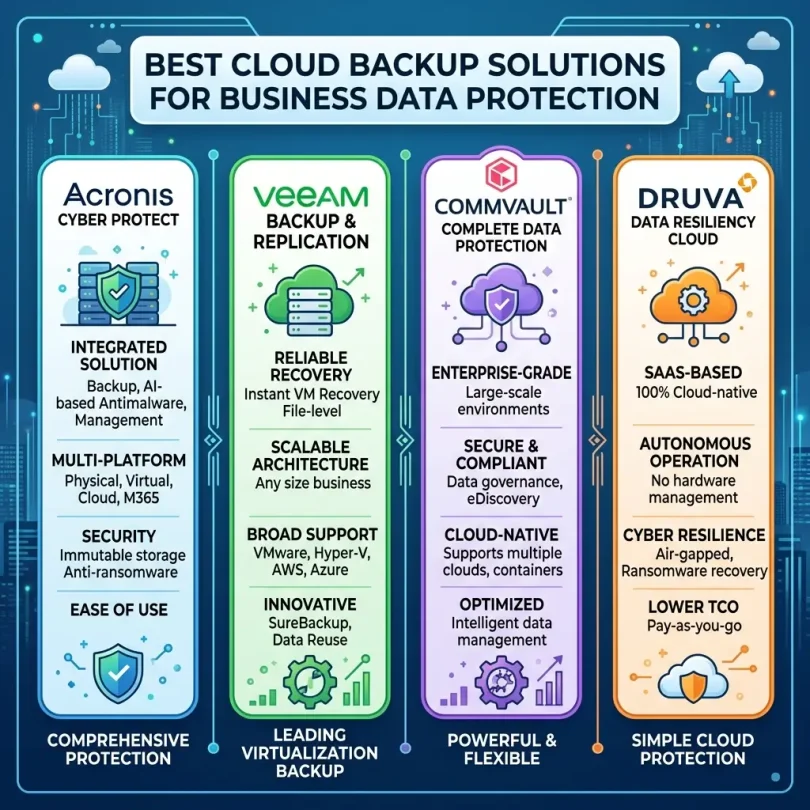
Acronis Cyber Protect is a strong option for companies that want cloud backup, endpoint protection, anti-ransomware features, disaster recovery tools, and centralized management in one solution. It is especially useful for businesses that want to reduce the number of separate tools they manage.
The main advantage of Acronis is that it combines data protection with cybersecurity features. This matters because many data loss incidents are caused by cyber threats such as ransomware, malware, phishing-related account compromise, or endpoint attacks.
Instead of only storing backup copies, Acronis can also help protect devices and workloads from threats. For small businesses, this can be attractive because it creates a more complete business continuity approach.
Key Features
- Cloud backup and recovery
- Endpoint protection
- Anti-ransomware capabilities
- File, device and workload backup
- Centralized management console
- Patch management options
- Disaster recovery features depending on plan
Pros
- Combines backup and cybersecurity
- Useful for ransomware recovery planning
- Good for businesses with limited IT resources
- Can protect endpoints and important workloads
Cons
- Plans and features can feel complex
- Some businesses may not need all security features
- Proper setup is important for best results
Best Use Case
Choose Acronis Cyber Protect if your business wants cloud backup, ransomware protection, endpoint security, and recovery tools in a single platform.
2. Backblaze Business Backup
Best for: Simple and affordable computer backup
Backblaze Business Backup is popular with small businesses that want straightforward cloud backup for business computers. It is known for simple setup, automatic backup, and easy file recovery. For companies that mainly need to back up laptops and desktops, Backblaze can be a practical choice.
Backblaze is especially useful for teams that do not want complicated backup rules. Once installed, it can automatically back up important files from business computers to the cloud.
Key Features
- Automatic computer backup
- Cloud file backup
- File restore options
- Admin management for business accounts
- Version history options
- Simple deployment
Pros
- Very easy to use
- Good for small business computers
- Simple pricing approach compared with many enterprise tools
- Strong fit for teams without complex IT needs
Cons
- Not always ideal for complex server backup
- May require extra tools for SaaS backup
- Advanced disaster recovery needs may require another platform
Best Use Case
Choose Backblaze Business Backup if your small business mainly needs simple, automatic cloud backup for employee computers and business files.
3. IDrive Business
Best for: Multi-device backup on a flexible budget
IDrive Business is a cloud backup solution that supports backup for multiple devices, including computers, servers, and business files depending on the plan. It is often considered by small businesses that want flexible storage and support for different device types.
IDrive can be useful for companies with laptops, desktops, mobile devices, and some server backup needs. It may also appeal to businesses that want more control over storage capacity and device coverage.
Key Features
- Cloud backup for multiple devices
- File and folder backup
- Server backup options
- Versioning and restore features
- Centralized web console
- Hybrid backup options depending on setup
Pros
- Supports many device types
- Good value for storage-focused businesses
- Flexible business plans
- Useful for small businesses with multiple systems
Cons
- Storage limits must be reviewed carefully
- User interface may feel more technical than simpler tools
- Businesses with advanced compliance needs may need extra review
Best Use Case
Choose IDrive Business if you need affordable cloud backup for multiple devices and want flexible storage options.
4. Carbonite Safe for Business
Best for: Basic business file backup
Carbonite Safe for Business is designed for small businesses that want automatic backup and recovery for important files. It can be a good fit for small offices, professional service businesses, consultants, and teams that need protection against accidental deletion, device failure, or file loss.
Carbonite is generally more focused on backup simplicity than advanced cybersecurity. Businesses with heavier security or disaster recovery needs may want to compare higher-level plans or additional tools.
Key Features
- Automatic cloud backup
- File recovery
- Business device protection
- Centralized account management
- Backup for selected files and folders
Pros
- Simple backup experience
- Good for small office file protection
- Recognizable backup brand
- Useful for basic business continuity
Cons
- May not be enough for complex infrastructure
- Advanced features depend on plan
- Businesses may need separate cybersecurity tools
Best Use Case
Choose Carbonite Safe for Business if your company needs simple automatic backup for important business files and office devices.
5. CrashPlan
Best for: Continuous endpoint backup
CrashPlan is a business backup solution focused on automatic endpoint backup. It is useful for companies that want to protect employee laptops and desktops with continuous backup and simple recovery.
For remote teams and knowledge workers, endpoint backup is important because valuable work may live on individual devices before it reaches shared drives or business systems. CrashPlan helps reduce the risk of losing that local work.
Key Features
- Automatic endpoint backup
- Continuous file protection
- Version history
- Admin controls
- File restore tools
- Support for distributed teams
Pros
- Good for remote workers
- Strong endpoint backup focus
- Simple recovery for user files
- Useful for businesses with many laptops
Cons
- Not a full cybersecurity suite
- May not replace server or SaaS backup
- Best for endpoint data rather than every business workload
Best Use Case
Choose CrashPlan if your business needs continuous cloud backup for employee laptops and desktops, especially in remote or hybrid work environments.
6. Veeam Data Platform
Best for: Advanced backup, recovery and business continuity
Veeam is a well-known backup and recovery platform used by businesses that need protection for servers, virtual machines, cloud workloads, SaaS data, and enterprise environments. It is more advanced than simple computer backup tools and is often used by companies with IT staff or managed service providers.
For growing businesses, Veeam can be valuable when backup needs become more complex. It can support virtual environments, cloud workloads, Microsoft 365 backup, disaster recovery planning, and more advanced recovery strategies.
Key Features
- Backup and recovery for servers and workloads
- Virtual machine backup
- Microsoft 365 backup options
- Cloud workload protection
- Ransomware recovery capabilities
- Disaster recovery support
- Monitoring and reporting
Pros
- Strong for advanced backup environments
- Good for businesses with servers and VMs
- Flexible recovery options
- Widely used in IT-managed environments
Cons
- May be too complex for very small businesses
- Usually requires technical setup
- Pricing and licensing need careful review
Best Use Case
Choose Veeam if your business has servers, virtual machines, cloud workloads, Microsoft 365 data, or advanced recovery requirements.
7. Druva
Best for: Cloud-native backup and SaaS data protection
Druva is a cloud-native data protection platform designed for businesses that need backup for endpoints, SaaS apps, cloud workloads, and enterprise data. It is useful for cloud-first companies, remote teams, and organizations that want centralized data protection without managing a lot of backup hardware.
Druva can be a strong choice when a business relies heavily on Microsoft 365, Google Workspace, Salesforce, cloud apps, and distributed employees.
Key Features
- Cloud-native backup
- SaaS backup options
- Endpoint data protection
- Cloud workload backup
- Centralized management
- Data governance and security features
Pros
- Good for cloud-first companies
- Supports SaaS and endpoint backup
- Centralized data protection approach
- Useful for remote and distributed teams
Cons
- May be more advanced than a tiny business needs
- Pricing should be reviewed carefully
- Best value depends on data complexity
Best Use Case
Choose Druva if your business depends on SaaS applications, remote endpoints, and cloud workloads, and you want centralized cloud-native data protection.
8. Datto Backup Solutions
Best for: Managed backup and disaster recovery through an MSP
Datto is well known in the managed service provider market. Many small and mid-sized businesses use Datto through IT providers to get backup, disaster recovery, and business continuity support.
This can be useful for companies that do not want to manage backup systems themselves. Instead, an MSP can help configure, monitor, test, and recover backups when needed.
Key Features
- Business backup and recovery
- Disaster recovery options
- Continuity solutions
- MSP-managed backup support
- Device and server protection
- Recovery testing depending on provider setup
Pros
- Strong fit for managed IT environments
- Good for business continuity planning
- Useful for small businesses without internal IT teams
- Can include professional backup monitoring
Cons
- Usually purchased through an MSP
- Pricing depends on provider and package
- Less suitable for businesses wanting self-service only
Best Use Case
Choose Datto if your small business works with a managed IT provider and wants backup, disaster recovery, and business continuity support handled professionally.
9. Rubrik
Best for: Cyber recovery and data resilience
Rubrik is a data security and backup platform focused on cyber resilience, ransomware recovery, and business data protection. It is generally more suitable for organizations with higher security, compliance, and infrastructure requirements.
While it may be more advanced than what a small local business needs, it can be relevant for growing companies, regulated businesses, SaaS companies, and organizations that need strong data protection and cyber recovery planning.
Key Features
- Backup and recovery
- Cyber recovery features
- Ransomware resilience
- Data security posture features
- Cloud and workload protection
- Monitoring and reporting
Pros
- Strong cyber resilience focus
- Useful for sensitive data environments
- Advanced recovery features
- Good for companies with serious compliance needs
Cons
- May be too expensive or complex for very small businesses
- Usually requires technical planning
- Best for higher-risk environments
Best Use Case
Choose Rubrik if your business has sensitive data, high downtime risk, compliance requirements, or a serious need for ransomware recovery and cyber resilience.
10. AvePoint Cloud Backup
Best for: Microsoft 365, Google Workspace and SaaS backup
AvePoint Cloud Backup is useful for businesses that rely heavily on SaaS tools such as Microsoft 365, Google Workspace, and Salesforce. Many companies mistakenly believe that SaaS platforms remove the need for backup. In reality, businesses are still responsible for recovering from accidental deletion, user mistakes, retention gaps, and account compromise.
AvePoint can help protect email, documents, Teams data, SharePoint, OneDrive, Google Workspace data, and other SaaS content depending on the plan.
Key Features
- Microsoft 365 backup
- Google Workspace backup
- Salesforce backup options
- Granular recovery
- Automated backup
- SaaS data protection controls
Pros
- Strong SaaS backup focus
- Good for Microsoft 365-heavy businesses
- Useful granular restore options
- Helps protect collaboration data
Cons
- Not mainly an endpoint backup tool
- May need another solution for laptops or servers
- Best value depends on SaaS usage
Best Use Case
Choose AvePoint Cloud Backup if your business depends on Microsoft 365, Google Workspace, or Salesforce and needs reliable SaaS data backup.
11. Synology C2 Backup
Best for: Businesses using Synology NAS devices
Synology C2 Backup can be a good fit for businesses already using Synology NAS systems or those that want a combination of local storage and cloud backup. It can support business backup strategies where files are stored locally but also protected in the cloud.
For small businesses with office file servers, media files, creative assets, or local NAS storage, Synology C2 can be part of a hybrid backup strategy.
Key Features
- Cloud backup for Synology environments
- Business data protection
- Endpoint and server backup options depending on plan
- Centralized management
- Recovery features
Pros
- Good for Synology users
- Supports hybrid backup strategies
- Useful for local plus cloud protection
- Can fit small office environments
Cons
- Best fit if you already use Synology
- May not be ideal for businesses needing broad SaaS backup
- Feature set depends on selected service
Best Use Case
Choose Synology C2 Backup if your business uses Synology NAS devices and wants cloud backup as part of a hybrid data protection plan.
Best Cloud Backup Solution by Business Type
Best for Small Offices
Small offices usually need simple backup for computers, shared files, and important documents. Backblaze Business Backup, Carbonite, IDrive Business, CrashPlan, and Acronis Cyber Protect are good options to compare.
Best for Remote Teams
Remote teams need endpoint backup, cloud app backup, and centralized management. CrashPlan, Backblaze, Druva, Acronis, and Microsoft 365 backup-focused solutions can be useful depending on your workflow.
Best for Agencies
Agencies handle client files, design assets, campaign reports, contracts, websites, and login data. Acronis, IDrive, Backblaze, CrashPlan, and SaaS backup tools can help protect both local and cloud-based work.
Best for Ecommerce Businesses
Ecommerce businesses should back up product data, customer records, order exports, website files, databases, theme files, plugin settings, and marketing data. In addition to cloud backup, ecommerce sites should use secure hosting, regular website backups, and strong admin access controls.
Best for Professional Services
Law firms, accountants, consultants, clinics, and advisors often store sensitive client documents. These businesses should choose backup tools with encryption, access controls, retention settings, and reliable restore options.
Best for SaaS and Tech Companies
SaaS and tech companies may need backup for cloud workloads, databases, repositories, internal files, customer data, and collaboration platforms. Veeam, Druva, Rubrik, Acronis, and SaaS-focused backup platforms may be stronger fits.
Cloud Backup and Ransomware Recovery
Ransomware is one of the biggest reasons businesses invest in cloud backup. If ransomware encrypts important files, a clean backup may allow the business to restore data instead of losing everything.
However, not every backup is ransomware-safe. If backups are connected to the same compromised system, attackers may try to delete or encrypt them too. That is why businesses should look for backup solutions with strong access controls, version history, immutable backup options, separate admin accounts, and protected recovery points.
Backup Features That Help With Ransomware Recovery
- Immutable backups
- Version history
- Separate backup credentials
- Multi-factor authentication
- Backup anomaly detection
- Clean recovery points
- Protected admin console
- Regular restore testing
Backup is not a replacement for cybersecurity software, but it is one of the most important recovery layers after a cyber incident.
What Is the 3-2-1 Backup Rule?
The 3-2-1 backup rule is a simple data protection strategy:
- Keep at least 3 copies of important data
- Store them on 2 different types of storage
- Keep 1 copy offsite or in the cloud
For example, a business might keep the original file on a laptop, a local backup on a NAS device, and an encrypted cloud backup. Some businesses also add an immutable backup or offline backup for stronger ransomware protection.
The goal is to avoid a single point of failure. If one device fails or one backup is damaged, another copy is still available.
How Much Does Business Cloud Backup Cost?
Cloud backup pricing depends on several factors:
- Number of users
- Number of devices
- Storage amount
- Type of data being backed up
- Retention period
- Server or endpoint backup needs
- SaaS backup requirements
- Security and compliance features
- Disaster recovery options
- Support level
Basic endpoint backup is usually cheaper than advanced disaster recovery or enterprise-grade data protection. SaaS backup for Microsoft 365, Google Workspace, or Salesforce may be priced separately from computer backup. Server backup and virtual machine backup can also cost more.
When comparing cloud backup pricing, do not only look at the monthly cost. Also check storage limits, restore fees, bandwidth limits, retention policy, deleted file recovery, support quality, and cancellation terms.
Cloud Backup Security Checklist for Small Businesses
Before choosing a cloud backup provider, review this security checklist:
- Does the solution encrypt data in transit and at rest?
- Does it support multi-factor authentication?
- Can admins control user access?
- Does it provide version history?
- Can it restore files after ransomware encryption?
- Does it support your operating systems and business apps?
- Does it alert you when backups fail?
- Can you restore individual files and full systems?
- Does it offer compliance features if needed?
- Can you test recovery before an emergency?
- Is customer support reliable?
- Are pricing and storage limits clear?
Common Cloud Backup Mistakes Businesses Should Avoid
Mistake 1: Assuming Cloud Drive Sync Is Backup
Google Drive, OneDrive, Dropbox, and similar tools are useful, but sync is not always the same as backup. If a file is deleted or corrupted and that change syncs, your data may still be at risk.
Mistake 2: Not Testing Restore
A backup is only useful if it can be restored. Many businesses discover too late that their backups are incomplete, outdated, or difficult to recover. Test restores regularly.
Mistake 3: Backing Up Only Some Devices
If employees store important work on laptops, those devices should be protected. Do not back up only the office server while ignoring remote computers.
Mistake 4: No Backup for Microsoft 365 or Google Workspace
SaaS apps can still lose data through user deletion, account compromise, or retention gaps. Businesses that depend on email and cloud documents should review SaaS backup options.
Mistake 5: Weak Admin Passwords
Your backup admin account should be protected with a strong password and MFA. If attackers access your backup dashboard, they may try to delete or damage recovery points.
Mistake 6: Choosing the Cheapest Plan Without Checking Limits
Low-cost backup plans may have storage limits, retention limits, slower support, or fewer restore options. Always compare real business requirements, not only price.
Mistake 7: No Written Recovery Plan
In an emergency, people panic. A written recovery plan helps your team know who to contact, what systems to restore first, and how to keep the business running.
How to Choose the Right Cloud Backup Solution
Step 1: List Your Critical Data
Start by listing the data your business cannot afford to lose. This may include customer records, invoices, website files, email, contracts, project folders, financial documents, databases, or product files.
Step 2: Decide What Needs Backup
Do you need to back up laptops, desktops, servers, NAS devices, Microsoft 365, Google Workspace, Salesforce, websites, databases, or cloud workloads? The answer will narrow your vendor list quickly.
Step 3: Define Recovery Time
Recovery time means how quickly your business needs data back after a failure. A small consultancy may tolerate a few hours. An ecommerce store, medical office, or SaaS company may need much faster recovery.
Step 4: Define Recovery Point
Recovery point means how much data you can afford to lose. If backups run once per day, you might lose a day of work. Continuous backup can reduce that risk.
Step 5: Compare Security Features
Look for encryption, MFA, admin controls, version history, immutable backup options, and ransomware recovery support.
Step 6: Test Restore Before You Commit
During a trial or demo, test file recovery. Check whether restoring data is simple, fast, and reliable. Backup marketing does not matter if restore is painful.
Step 7: Review Support and Contracts
Check support hours, response times, onboarding help, storage overage fees, retention terms, and cancellation policy. Business backup is too important to choose blindly.
Final Recommendation
The best cloud backup solution for business data protection depends on your data, devices, risk level, and recovery needs. For simple small business computer backup, Backblaze Business Backup, CrashPlan, Carbonite, and IDrive Business are strong options to compare. For backup plus cybersecurity, Acronis Cyber Protect is a practical choice. For advanced server, virtual machine, and workload backup, Veeam is a powerful platform. For cloud-native SaaS and endpoint backup, Druva and AvePoint can be valuable. For managed backup and disaster recovery, Datto is a strong option through an MSP. For cyber recovery and resilience, Rubrik may fit higher-risk organizations.
Small businesses should not wait until a ransomware attack, laptop theft, server crash, or accidental deletion happens. Start with automatic cloud backup, protect admin accounts with MFA, keep version history, test restore, and create a simple recovery plan.
Cloud backup is not just a technical tool. It is business insurance for your data, your operations, your customer trust, and your ability to keep working when something goes wrong.
FAQs About Cloud Backup Solutions for Business
What is the best cloud backup solution for small business?
The best solution depends on your needs. Backblaze, IDrive, Carbonite, CrashPlan, and Acronis are useful for small business file and endpoint backup. Veeam, Druva, Datto, Rubrik, and AvePoint may be better for advanced backup, SaaS backup, and disaster recovery.
Is cloud backup safe for business data?
Cloud backup can be safe when the provider uses strong encryption, secure access controls, MFA, reliable infrastructure, and clear privacy policies. Businesses should also use strong passwords, limited admin access, and regular restore testing.
Is Google Drive or OneDrive enough for backup?
Google Drive and OneDrive are helpful for storage and collaboration, but they may not replace a full backup solution. Businesses should consider dedicated backup for version history, deleted file recovery, ransomware recovery, and SaaS data protection.
How often should business data be backed up?
Important business data should be backed up automatically. Some businesses need continuous backup, while others may use hourly or daily schedules. The right frequency depends on how much data loss your business can tolerate.
What is ransomware recovery?
Ransomware recovery means restoring clean files or systems after ransomware encrypts or damages data. A good backup solution with version history and protected recovery points can help reduce ransomware damage.
Do small businesses need SaaS backup?
Yes, if they rely on Microsoft 365, Google Workspace, Salesforce, or similar apps. SaaS providers keep services running, but businesses still need protection against deletion, account compromise, retention issues, and user mistakes.
What is the 3-2-1 backup rule?
The 3-2-1 backup rule means keeping three copies of important data, using two different storage types, and keeping one copy offsite or in the cloud. It helps reduce the risk of losing all data from one failure.
How much cloud backup storage does a business need?
Storage needs depend on file size, number of users, devices, databases, media files, retention period, and version history. Businesses should estimate current data size and future growth before choosing a plan.
Can cloud backup protect against accidental deletion?
Yes, most cloud backup solutions can help recover deleted files within the retention period. Businesses should check how long deleted files and older versions are kept.
Should a small business use local backup and cloud backup together?
Yes, many businesses use both. Local backup can allow faster recovery, while cloud backup protects against theft, fire, hardware failure, and local disasters. A hybrid approach is often safer.