
Remote teams need more than chat messages and spreadsheets to manage work. When employees, freelancers, managers, developers, designers, marketers, writers, clients, and operations teams work from different locations, projects can quickly become confusing. Tasks get missed. Deadlines slip. Files are scattered. Meetings become too long. Nobody knows what is blocked, what is finished, or who owns the next step.
Project management software helps remote teams organize tasks, deadlines, workflows, files, conversations, approvals, timelines, goals, reports, and team responsibilities in one place. Instead of relying only on Slack messages, emails, WhatsApp chats, Google Sheets, or long meetings, a project management platform gives everyone a shared view of the work.
In 2026, project management software is not only about task lists. Modern platforms include Kanban boards, Gantt charts, calendars, dashboards, workload management, automations, AI summaries, time tracking, client portals, document collaboration, resource planning, templates, integrations, and reporting.
This guide compares the best project management software for remote teams, explains which features matter most, and helps you choose the right platform based on your team size, workflow, budget, and collaboration style.
Important note: This article is for general business technology guidance. Project management software pricing, free plan limits, AI features, user seats, storage, automations, guest access, integrations, and support options can change. Always check the latest plan details directly on the vendor website before choosing or upgrading a tool.
Quick Answer: What Is the Best Project Management Software for Remote Teams?
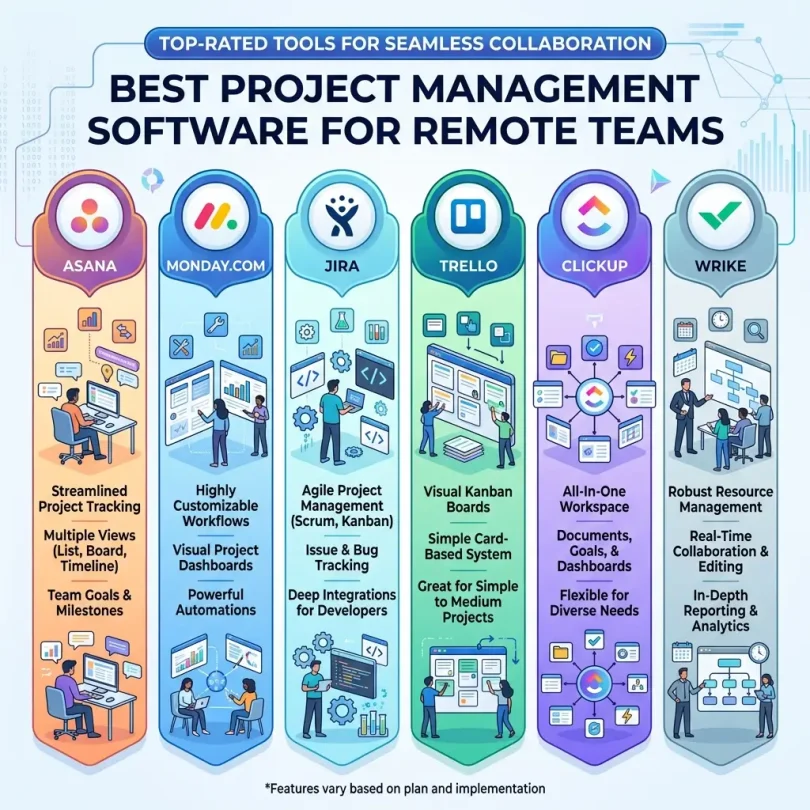
The best project management software for remote teams depends on how your team works. Asana is strong for cross-functional teams that need task tracking, workflows, timelines, and integrations. ClickUp is powerful for teams that want many features in one platform. monday.com is excellent for visual workflows, dashboards, and team visibility. Trello is best for simple Kanban boards and lightweight task tracking. Jira is best for software development and agile teams. Notion is useful for teams that want project management plus documentation. Wrike is good for collaboration, approvals, and complex team workflows. Smartsheet is strong for spreadsheet-style project planning and enterprise reporting. Basecamp is useful for simple team communication and project organization. Teamwork is strong for agencies and client-based work.
For most remote teams, the best project management tool is the one that gives clear ownership, deadline visibility, simple collaboration, and enough structure without becoming too complicated.
Best Project Management Software for Remote Teams: Comparison Table
| Software | Best For | Main Strength | Good Fit For |
|---|---|---|---|
| Asana | Cross-functional remote teams | Tasks, timelines, automations, integrations and project visibility | Marketing, operations, product and business teams |
| ClickUp | All-in-one productivity | Tasks, docs, goals, dashboards, time tracking and AI features | Teams wanting one platform for many workflows |
| monday.com | Visual workflow management | Custom boards, dashboards, automations and reporting | Remote teams needing visibility and flexible workflows |
| Trello | Simple Kanban boards | Cards, boards, lists and lightweight task tracking | Small teams, creators and simple projects |
| Jira | Software and agile teams | Sprints, backlogs, roadmaps, issues and developer workflows | Engineering, IT and product teams |
| Notion | Projects plus documentation | Docs, databases, wikis, tasks and knowledge management | Remote teams that need project info and docs together |
| Wrike | Complex collaboration | Dashboards, approvals, workload, reporting and project tracking | Agencies, marketing and enterprise teams |
| Smartsheet | Spreadsheet-style project control | Sheets, Gantt views, forms, automation and portfolio reporting | Operations, PMO and enterprise teams |
| Basecamp | Simple team communication | Messages, to-dos, schedules, files and simple project spaces | Small remote teams wanting less complexity |
| Teamwork | Client-based project work | Client collaboration, tasks, time tracking and project delivery | Agencies, consultants and service businesses |
| Microsoft Planner / Project | Microsoft 365 teams | Task planning, Microsoft integration and project scheduling | Businesses already using Microsoft 365 |
| Zoho Projects | Affordable project management | Tasks, milestones, Gantt charts, time tracking and Zoho integration | Budget-conscious small businesses |
Why Remote Teams Need Project Management Software
Remote teams do not have the same natural visibility as office teams. In an office, a manager can walk around, ask quick questions, and notice when someone is stuck. In remote work, delays can stay hidden until a deadline is missed.
Project management software creates visibility. It helps every team member understand what needs to be done, who owns it, when it is due, what is blocked, what files are attached, and what progress has already been made.
Remote project management software also reduces meeting overload. Instead of asking for status updates in long calls, managers can check dashboards, task boards, timelines, and comments. This saves time and helps teams focus on real work.
Common Remote Work Problems Project Management Software Solves
- Unclear task ownership
- Missed deadlines
- Too many status meetings
- Scattered files and conversations
- No central project timeline
- Confusion between tasks and priorities
- Poor handoff between departments
- No visibility into workload
- Difficulty managing freelancers or contractors
- Client approval delays
- Weak reporting for managers
- Duplicate work across team members
What to Look for in Project Management Software for Remote Teams
1. Task Management
Task management is the core of any project management system. A good tool should let you create tasks, assign owners, set due dates, add descriptions, attach files, create subtasks, add comments, and mark status clearly.
For remote teams, every important task should have one owner and one clear deadline. If a task has no owner, it usually gets ignored.
2. Multiple Project Views
Different people understand work differently. Some prefer lists. Some prefer Kanban boards. Some need calendars. Project managers often need timelines or Gantt charts. Executives may prefer dashboards.
The best project management software offers multiple views such as list, board, calendar, timeline, Gantt, workload, and dashboard views.
3. Team Collaboration
Remote collaboration works best when project discussion stays close to the task. A good platform should allow comments, mentions, file attachments, approvals, status updates, and notifications so team members do not need to search through long chat threads.
4. Workflow Automation
Automation can save remote teams time. For example, when a task moves to “review,” the system can notify a manager. When a form is submitted, a task can be created automatically. When a due date is missed, the assignee can get a reminder.
Automation helps remote teams stay consistent without micromanagement.
5. Time Tracking
Time tracking is useful for agencies, freelancers, consultants, developers, designers, and service businesses. It helps measure billable hours, project profitability, workload, and delivery estimates.
6. Workload Management
Remote managers need to know who is overloaded and who has capacity. Workload views help balance work across the team and avoid burnout.
7. File and Document Management
A project management tool should make it easy to attach files, link documents, organize briefs, store approvals, and connect with Google Drive, OneDrive, Dropbox, or other cloud storage tools.
8. Reporting Dashboards
Dashboards help managers see project health, overdue tasks, workload, completion percentage, upcoming deadlines, blocked tasks, and team performance. Reporting is important for remote teams because managers cannot rely on physical presence to understand progress.
9. Integrations
Project management software should connect with tools your team already uses. Common integrations include Slack, Microsoft Teams, Google Workspace, Microsoft 365, Zoom, GitHub, GitLab, Figma, HubSpot, Salesforce, Jira, Zendesk, Intercom, Zapier, Make, Dropbox, OneDrive, and Google Drive.
10. Ease of Use
Feature-rich software is only valuable if the team uses it. If the interface is confusing, employees may go back to spreadsheets and chat messages. For remote teams, adoption is more important than having every possible feature.
Best Project Management Software for Remote Teams: Detailed Reviews
1. Asana
Best for: Cross-functional remote teams
Asana is one of the most popular project management tools for remote and hybrid teams. It is designed to help teams manage tasks, projects, timelines, goals, workflows, and cross-functional work in one place.
Asana works well for marketing teams, operations teams, product teams, HR teams, content teams, agencies, and business departments that need clear task ownership and deadline visibility. It provides multiple views, including list, board, calendar and timeline-style planning depending on plan.
Recent project-management comparisons continue to list Asana among the major tools for cross-functional project work, alongside platforms such as Trello, monday.com, Jira and Microsoft Project.
Key Features
- Task and subtask management
- List, board, calendar and timeline views
- Project templates
- Workflow automation
- Goals and reporting features depending on plan
- Task dependencies
- Team collaboration and comments
- Large integration ecosystem
Pros
- Clean and flexible interface
- Good for cross-team collaboration
- Useful timeline and workload features
- Strong integration options
- Works well for marketing, operations and product teams
Cons
- Advanced features require paid plans
- Can become messy without clear project structure
- Not as developer-specific as Jira
- May be more than very small teams need
Best Use Case
Choose Asana if your remote team needs organized task management, project timelines, collaboration, automations, and visibility across departments.
2. ClickUp
Best for: All-in-one productivity and customizable workflows
ClickUp is a feature-rich project management platform that combines tasks, docs, goals, dashboards, whiteboards, time tracking, automations, forms, templates, and AI features depending on plan. It is popular with teams that want to reduce the number of separate tools they use.
ClickUp can work for remote teams in marketing, operations, product, software, content, agencies, HR, and business management. Its biggest strength is flexibility. Teams can build simple task boards or complex workflows with custom fields, statuses, dashboards and views.
The trade-off is that ClickUp can feel overwhelming if not configured carefully. Remote teams should start simple and add complexity slowly.
Key Features
- Task and project management
- List, board, calendar, Gantt and timeline views
- Docs and knowledge management
- Goals and dashboards
- Time tracking
- Workflow automation
- Custom fields and statuses
- AI productivity features depending on plan
Pros
- Very feature-rich
- Highly customizable
- Can replace multiple tools
- Good for remote teams with different workflows
- Strong dashboard and reporting options
Cons
- Can feel complex for beginners
- Requires setup discipline
- Too many features can reduce adoption
- Performance and workflow experience may vary by workspace size
Best Use Case
Choose ClickUp if your remote team wants one flexible platform for tasks, docs, goals, dashboards, time tracking and workflow automation.
3. monday.com
Best for: Visual project tracking and team visibility
monday.com is a visual work management platform that helps teams manage projects, workflows, tasks, operations, sales processes, content calendars, campaigns, and team dashboards. It is popular with remote teams because its boards are easy to understand and highly customizable.
monday.com is especially useful when managers need visibility. Teams can build dashboards, track status, automate updates, organize work by owners and deadlines, and create workflows for approvals, requests, production, operations, and reporting.
Current 2026 project-management guides regularly include monday.com among leading options for project and workflow management, especially where visual boards, integrations, and reporting matter.
Key Features
- Visual boards and custom workflows
- Task management
- Dashboards and reporting
- Automations
- Forms and request intake
- Timeline and Gantt-style views depending on plan
- Workload views
- Integrations with business tools
Pros
- Very visual and easy to understand
- Good for dashboards and team visibility
- Flexible for many business workflows
- Useful automations
- Strong for operations and marketing teams
Cons
- Pricing can rise with users and features
- Advanced reporting may require higher plans
- Too many boards can become hard to manage
- Setup should be standardized across teams
Best Use Case
Choose monday.com if your remote team wants visual project tracking, custom workflows, dashboards, status updates and management visibility.
4. Trello
Best for: Simple Kanban task management
Trello is one of the simplest project management tools. It uses boards, lists and cards to help teams organize work visually. A typical Trello board may have lists like To Do, In Progress, Review and Done.
Trello is good for small remote teams, creators, freelancers, lightweight content calendars, personal productivity, simple sprint boards, client task boards, and teams that do not need heavy reporting or complex workflows.
Its simplicity is the biggest advantage. But for larger remote teams, Trello may require power-ups, integrations, or another tool for advanced reporting, workload management and complex project planning.
Key Features
- Kanban boards
- Cards and lists
- Checklists
- Due dates
- Labels and members
- Power-ups and integrations
- Templates
- Simple automation features
Pros
- Very easy to use
- Great for simple workflows
- Fast onboarding for remote teams
- Good for visual task tracking
- Useful free or starter-level options
Cons
- Limited advanced reporting
- Can become messy with many boards
- Not ideal for complex project dependencies
- Large teams may outgrow it
Best Use Case
Choose Trello if your remote team wants a simple Kanban board for lightweight task tracking without heavy project management complexity.
5. Jira
Best for: Software development and agile teams
Jira is one of the strongest project management tools for software development teams. It is widely used for agile workflows, Scrum, Kanban, issue tracking, sprint planning, backlogs, bug tracking, roadmaps and release management.
Jira is best for remote engineering teams, IT teams, product teams and technical organizations that need structured development workflows. It integrates well with developer tools such as GitHub, Bitbucket, GitLab and CI/CD systems.
Many 2026 project-management comparisons still position Jira as a standard choice for software and agile teams because of sprint backlogs, roadmaps, release planning and issue-management depth.
Key Features
- Scrum and Kanban boards
- Backlog management
- Sprint planning
- Issue tracking
- Roadmaps
- Release management
- Agile reports
- Developer tool integrations
Pros
- Excellent for software teams
- Strong agile project management
- Powerful issue tracking
- Good integrations for developers
- Scales for technical organizations
Cons
- Can feel complex for non-technical teams
- Setup requires process discipline
- Not ideal for simple marketing or admin work
- Too much structure for very small teams
Best Use Case
Choose Jira if your remote team manages software development, bugs, sprints, product roadmaps, releases or IT projects.
6. Notion
Best for: Project management plus documentation
Notion is a flexible workspace for notes, docs, databases, wikis, tasks, project trackers, content calendars, knowledge bases and team documentation. It is useful for remote teams because it combines project information and company knowledge in one place.
Notion works well for startups, content teams, creators, agencies, product teams, operations teams and remote teams that need documentation as much as task tracking. A project page can include the brief, task database, meeting notes, files, decisions and status updates together.
Notion is highly flexible, but teams should create clear templates and rules. Without structure, workspaces can become messy.
Key Features
- Docs and pages
- Databases and project trackers
- Task views
- Internal wikis
- Meeting notes
- Templates
- AI features depending on plan
- Team collaboration
Pros
- Great for documentation-heavy teams
- Flexible databases and pages
- Useful for internal knowledge bases
- Good for startups and content teams
- Can combine project context and tasks
Cons
- Not as structured as dedicated PM tools
- Can become messy without templates
- Advanced reporting is limited compared with Asana or monday.com
- Not ideal for complex dependency management
Best Use Case
Choose Notion if your remote team wants project tracking, documentation, wikis and team knowledge in one flexible workspace.
7. Wrike
Best for: Complex collaboration, approvals and reporting
Wrike is a powerful project management platform for teams that need advanced collaboration, dashboards, approvals, workload views, custom workflows, project templates and reporting. It is often used by marketing teams, agencies, creative teams, professional services, operations teams and enterprise departments.
Wrike can be especially useful for remote teams that need to manage multiple projects, approvals, stakeholders, review cycles and cross-functional work. Its structure can help teams keep complex work organized.
Wrike’s 2026 guide lists many major project management options and highlights use-case differences, while TechRadar’s 2026 Gantt chart roundup notes Wrike’s collaboration and advanced task-management strengths for multi-project work.
Key Features
- Task and project management
- Custom workflows
- Dashboards and reports
- Gantt charts
- Approvals and proofing depending on plan
- Workload management
- Time tracking
- Integrations
Pros
- Strong for complex team workflows
- Good reporting and dashboards
- Useful for agencies and marketing teams
- Supports approvals and review cycles
- Scalable for larger teams
Cons
- Can take time to set up properly
- May be too advanced for very small teams
- Pricing and plan features should be reviewed
- Learning curve is higher than Trello or Basecamp
Best Use Case
Choose Wrike if your remote team manages complex projects, approvals, reports, workloads and multi-team collaboration.
8. Smartsheet
Best for: Spreadsheet-style project management and enterprise reporting
Smartsheet is a project management and work management platform that feels familiar to spreadsheet users but adds collaboration, automation, dashboards, forms, reports, and project views. It is popular with operations teams, project management offices, enterprise teams, construction, professional services and business departments that need structured planning.
Smartsheet is useful when teams like spreadsheet-style control but need stronger project tracking and reporting than Excel or Google Sheets can provide.
Key Features
- Spreadsheet-style project sheets
- Gantt and calendar views
- Forms and request intake
- Automations
- Dashboards and reports
- Resource and portfolio features depending on plan
- Collaboration tools
- Enterprise controls
Pros
- Familiar for spreadsheet users
- Strong reporting and dashboards
- Good for structured project planning
- Useful for enterprise and operations teams
- Supports forms and automation
Cons
- Can feel less modern than visual board tools
- May require setup expertise
- Not ideal for teams wanting simple Kanban only
- Advanced features may increase cost
Best Use Case
Choose Smartsheet if your remote team wants spreadsheet-style project control with dashboards, automation, Gantt views and enterprise reporting.
9. Basecamp
Best for: Simple remote team communication and project spaces
Basecamp is a simple project management and team communication tool. It organizes work into project spaces with message boards, to-do lists, schedules, docs, files, group chat and automatic check-ins.
Basecamp is useful for small remote teams that want fewer tools, fewer notifications, and less complexity. It is not as feature-heavy as ClickUp, Asana or monday.com, but that can be a strength for teams that want simple project organization.
Key Features
- Project spaces
- To-do lists
- Message boards
- Schedules
- Docs and files
- Group chat
- Automatic check-ins
- Client access options depending on plan
Pros
- Simple and easy to understand
- Good for team communication
- Reduces need for long email threads
- Useful for small remote teams
- Less overwhelming than complex tools
Cons
- Limited advanced reporting
- Not ideal for complex dependencies
- Less customizable than monday.com or ClickUp
- May not fit technical agile teams
Best Use Case
Choose Basecamp if your remote team wants simple project spaces, to-do lists, schedules, files and communication without complex project management overhead.
10. Teamwork
Best for: Agencies, client projects and billable work
Teamwork is built for client-based project management. It is useful for agencies, consultants, professional services, creative teams, marketing teams and businesses that manage client delivery.
Teamwork includes project tasks, milestones, time tracking, billing-related workflows, client collaboration and workload features depending on plan. This makes it especially useful for remote agencies that need to manage internal team members and external clients in the same project environment.
Project-management.com’s recent testing notes Teamwork.com as a strong option for end-to-end client operations, especially where client access, portfolios and timesheets matter.
Key Features
- Task and project management
- Client collaboration
- Time tracking
- Milestones
- Workload planning
- Project templates
- Budget and profitability features depending on plan
- Reporting dashboards
Pros
- Strong for agencies and service businesses
- Good client collaboration features
- Useful time tracking
- Helps manage billable work
- Supports project delivery from planning to completion
Cons
- May be more agency-focused than general teams need
- Advanced features depend on plan
- Setup can take time
- Not as simple as Trello or Basecamp
Best Use Case
Choose Teamwork if your remote team manages client projects, billable hours, agency workflows, consulting delivery or professional services work.
11. Microsoft Planner / Microsoft Project
Best for: Teams already using Microsoft 365
Microsoft Planner and Microsoft Project are useful for businesses already working inside Microsoft 365, Teams, Outlook, SharePoint and OneDrive. Planner is simpler and better for team task planning, while Microsoft Project is more advanced for formal project scheduling and resource planning.
For remote teams using Microsoft Teams every day, Microsoft project tools can reduce tool switching. They work best when the company is already committed to the Microsoft ecosystem.
Key Features
- Task planning
- Microsoft Teams integration
- Microsoft 365 ecosystem support
- Project scheduling depending on product
- Files through SharePoint and OneDrive
- Team collaboration
- Advanced planning features in Microsoft Project
Pros
- Good for Microsoft 365 users
- Works with Teams and Outlook workflows
- Planner is simple for task tracking
- Project supports more formal planning
- Useful for businesses already paying for Microsoft tools
Cons
- Can be less flexible than dedicated PM tools
- Microsoft Project may feel complex
- Best value depends on Microsoft 365 usage
- Not ideal for teams outside Microsoft ecosystem
Best Use Case
Choose Microsoft Planner or Microsoft Project if your remote team already uses Microsoft 365 and wants project planning inside the Microsoft environment.
12. Zoho Projects
Best for: Affordable project management for small businesses
Zoho Projects is a budget-friendly project management tool with tasks, milestones, Gantt charts, time tracking, issue tracking, automation and integrations with other Zoho business apps. It is a good option for small businesses that want practical project management without premium pricing.
Zoho Projects is especially useful for teams already using Zoho CRM, Zoho Books, Zoho Mail or other Zoho products. It can support remote teams that need task tracking, project timelines and collaboration at a reasonable cost.
Key Features
- Task and milestone tracking
- Gantt charts
- Time tracking
- Issue tracking
- Project templates
- Automation features
- Zoho ecosystem integrations
- Reports and dashboards
Pros
- Affordable for small businesses
- Good feature set for the price
- Useful if you already use Zoho apps
- Includes time tracking and Gantt features
- Practical for remote teams
Cons
- Interface may feel less polished than some competitors
- Advanced customization may require setup time
- Best value is stronger inside Zoho ecosystem
- Not as widely adopted as Asana or monday.com
Best Use Case
Choose Zoho Projects if your remote team wants affordable project management with tasks, milestones, Gantt charts and time tracking.
Best Project Management Software by Remote Team Type
Best for Small Remote Teams
Trello, Basecamp, Asana, ClickUp and Zoho Projects are good options for small remote teams. Trello and Basecamp are simpler, while Asana and ClickUp offer more structure and scalability.
Best for Marketing Teams
Asana, monday.com, Wrike, ClickUp and Teamwork are strong choices for remote marketing teams. These tools can manage campaigns, content calendars, approvals, deadlines, creative requests and cross-functional collaboration.
Best for Software Development Teams
Jira is the strongest choice for agile software teams. ClickUp, Linear, GitHub Projects, Asana and Azure DevOps may also be useful depending on the development workflow.
Best for Agencies
Teamwork, ClickUp, Asana, monday.com and Wrike are strong agency options. Agencies should look for client access, time tracking, templates, approvals, workload planning and profitability reporting.
Best for Operations Teams
monday.com, Smartsheet, Asana, ClickUp and Wrike are practical for operations because they support workflows, dashboards, forms, automations and reporting.
Best for Documentation-Heavy Teams
Notion is a strong option for teams that need project management and documentation together. ClickUp and Confluence-connected Jira setups can also work for documentation-heavy teams.
Best for Microsoft 365 Teams
Microsoft Planner and Microsoft Project are natural options for businesses already using Microsoft Teams, Outlook, SharePoint and OneDrive. Asana, Trello, ClickUp and monday.com also offer Microsoft integrations.
Project Management Software Pricing: What Remote Teams Should Know
Project management pricing often depends on number of users, feature tier, guest access, storage, automations, dashboards, time tracking, reporting, AI features, integrations and security controls. Some tools offer free plans, but free plans usually have limits.
Common Pricing Factors
- Number of users or seats
- Guest or client access
- Number of projects
- Storage limits
- Automation limits
- Dashboard and reporting features
- Timeline or Gantt views
- Time tracking
- Workload management
- AI features
- Admin controls
- Security and compliance features
- Priority support
Remote teams should calculate the real monthly cost based on active users and required features. A tool may look affordable until you add guests, automations, dashboards, time tracking and advanced reporting.
Remote Project Management Setup Checklist
After choosing a tool, set it up properly. A project management platform only works if the team follows a clear system.
- Create one workspace structure for all teams
- Define standard project templates
- Use clear task statuses
- Assign one owner per task
- Add realistic due dates
- Keep project discussions inside tasks
- Connect files from Google Drive, OneDrive or Dropbox
- Use dashboards for managers
- Create weekly review routines
- Archive old projects
- Train the team on basic rules
- Review tool adoption after 30 days
Common Mistakes Remote Teams Make With Project Management Tools
Mistake 1: Using Too Many Tools
If work is split between Trello, Asana, Slack, Google Sheets, Notion and email, nobody knows which source is final. Choose one main project system and define what belongs there.
Mistake 2: No Clear Task Owner
Every task should have one owner. If three people are assigned equally, each may assume someone else will handle it.
Mistake 3: Turning the Tool Into a Messy Database
Too many custom fields, statuses, boards and templates can confuse the team. Start simple and add complexity only when needed.
Mistake 4: Keeping Important Decisions in Chat
Chat is good for quick discussion, but important decisions should be added to the project task or document. Otherwise, team members have to search old messages.
Mistake 5: No Weekly Review
Remote teams need a review rhythm. Check overdue tasks, blocked work, upcoming deadlines and workload at least once per week.
Mistake 6: Ignoring Workload
Remote employees can become overloaded quietly. Use workload views or regular check-ins to balance tasks fairly.
Mistake 7: Choosing a Tool Without Testing
Do not buy a yearly plan before testing. Create a real project, invite the team, add tasks, test views, check notifications and see whether the workflow feels natural.
How to Choose the Best Project Management Tool for Your Remote Team
Step 1: Identify Your Workflow
Are you managing content, software, client work, operations, marketing campaigns, product launches, HR tasks or support projects? Your workflow should guide your tool choice.
Step 2: Choose Your Main View
If your team loves visual boards, Trello or monday.com may fit. If you need timelines, Asana, ClickUp or Wrike may be stronger. If you need spreadsheets, Smartsheet may be better. If you need agile boards, Jira is the natural choice.
Step 3: Check Collaboration Needs
Do you need comments, approvals, file sharing, client access, guest users, proofing, chat-style updates or documentation? Choose a tool that supports how your team communicates.
Step 4: Review Integrations
Make sure the tool connects with your email, calendar, cloud storage, chat app, CRM, developer tools, design tools and automation software.
Step 5: Test With a Real Project
Do not test with dummy tasks only. Use a real project and see whether the team can manage it easily.
Step 6: Calculate Long-Term Cost
Include user seats, guests, automations, reporting, storage, AI features, time tracking and admin controls.
Step 7: Pick for Adoption
The best tool is not the one with the most features. It is the one your remote team will actually use consistently.
Final Recommendation
The best project management software for remote teams depends on your work style. Asana is excellent for cross-functional teams that need task clarity, timelines, workflows and integrations. ClickUp is best for teams that want an all-in-one productivity platform with deep customization. monday.com is strong for visual workflows, dashboards and team visibility. Trello is best for simple Kanban boards. Jira is the strongest choice for software and agile teams. Notion is useful when documentation and project tracking need to live together. Wrike is better for complex collaboration, approvals and reporting. Smartsheet is best for spreadsheet-style project planning and enterprise reporting. Basecamp is good for simple team communication. Teamwork is strong for agencies and client-based projects. Microsoft Planner or Project is a natural fit for Microsoft 365 businesses, while Zoho Projects is a practical affordable option.
For remote teams, the real goal is not just tracking tasks. The goal is clarity. Everyone should know what matters, who owns it, when it is due, where files are stored, what is blocked and what has changed. The right project management software can reduce confusion, shorten meetings, improve accountability and help remote teams deliver work on time.
FAQs About Project Management Software for Remote Teams
What is the best project management software for remote teams?
Asana, ClickUp, monday.com, Trello, Jira, Notion, Wrike, Smartsheet, Basecamp, Teamwork, Microsoft Planner and Zoho Projects are all strong options. The best choice depends on your workflow, team size, budget and collaboration needs.
Is Asana good for remote teams?
Yes. Asana is good for remote teams that need task management, project timelines, automation, collaboration and visibility across departments.
Is ClickUp better than Asana?
ClickUp may be better if you want more features in one platform, including docs, goals, dashboards and time tracking. Asana may be better if you want a cleaner project management experience with strong adoption for cross-functional teams.
Is Trello enough for remote teams?
Trello is enough for simple remote workflows, small teams and Kanban-based task tracking. Larger teams may need stronger reporting, timelines, workload management and automation.
Which project management tool is best for software teams?
Jira is one of the best tools for software teams because it supports agile workflows, sprint planning, backlogs, issue tracking, roadmaps and developer integrations.
Which project management software is best for agencies?
Teamwork, Asana, ClickUp, monday.com and Wrike are strong options for agencies. Agencies should look for time tracking, client access, approvals, templates, workload planning and reporting.
Do remote teams need project management software?
Yes, remote teams benefit from project management software because it creates task ownership, deadline visibility, file organization, workflow clarity and better reporting.
What features matter most for remote teams?
The most important features are task ownership, due dates, multiple project views, comments, file attachments, dashboards, automations, integrations, workload management and easy notifications.
Can project management software reduce meetings?
Yes. When tasks, status updates, blockers and deadlines are visible in one place, teams need fewer long status meetings.
How should a remote team start using project management software?
Start with one real project, create clear statuses, assign one owner per task, set due dates, keep comments inside tasks, use templates and review progress weekly.