
Remote work has changed how businesses think about security. Employees now access company files, cloud apps, email, CRM platforms, dashboards, admin panels, databases, and internal tools from home networks, coworking spaces, hotels, airports, mobile hotspots, and public Wi-Fi. This flexibility is good for productivity, but it also creates new security risks.
A business VPN can help protect remote access by encrypting internet traffic, hiding public IP exposure, securing connections on unsafe networks, and giving teams a safer way to access company resources. For small businesses, agencies, consultants, startups, ecommerce companies, SaaS teams, legal offices, accounting firms, and customer support teams, the right VPN service can be an important part of a broader cybersecurity strategy.
However, VPNs are not all the same. A personal VPN made for streaming or private browsing is different from a business VPN designed for teams, admin control, dedicated IPs, centralized billing, access management, and secure remote work. Some modern platforms also go beyond traditional VPNs by offering zero-trust network access, device posture checks, identity-based access, single sign-on, and cloud security controls.
This guide compares the best VPN services for business security and remote teams, explains the most important features, and helps you choose a secure remote access solution for your company.
Important note: This article is for general business technology guidance. VPN features, pricing, server locations, dedicated IP options, logging policies, admin controls, and security certifications can change. Always review the latest provider documentation, privacy policy, security features, and business terms before choosing a VPN for company use.
Quick Answer: What Is the Best VPN for Business?
The best VPN for business depends on your team size, security requirements, and remote access needs. NordLayer is a strong business VPN option for small and mid-sized teams that need secure remote access, dedicated IPs, and centralized management. Perimeter 81 is useful for businesses looking for secure access service edge and zero-trust-style access. Twingate is a strong modern alternative to traditional VPN for identity-based private access. Cloudflare Zero Trust is powerful for businesses that want secure access, identity controls, and network protection. OpenVPN Access Server is good for teams that want self-managed VPN control. ExpressVPN for Teams and Surfshark for Business can work for companies that want easy team VPN management. Cisco AnyConnect / Cisco Secure Client and Fortinet FortiClient are better suited for businesses already using enterprise networking or firewall ecosystems.
For most small businesses, the best choice is a business VPN or secure access platform that includes strong encryption, team management, dedicated IP options, multi-factor authentication, device support, admin dashboards, access policies, and reliable customer support.
Best VPN Services for Business Security and Remote Teams: Comparison Table
| VPN / Secure Access Solution | Best For | Main Strength | Good Fit For |
|---|---|---|---|
| NordLayer | Small and mid-sized business VPN | Team management, dedicated IPs, secure remote access | Remote teams, agencies, startups and SMBs |
| Perimeter 81 | Modern business network security | Zero-trust access, cloud networking, secure remote work | Growing businesses needing advanced access control |
| Twingate | VPN alternative for private access | Identity-based access, zero-trust style connectivity | Cloud-first teams and modern IT environments |
| Cloudflare Zero Trust | Secure access and network protection | Identity-aware access, DNS filtering, secure web gateway options | Businesses wanting scalable zero-trust controls |
| OpenVPN Access Server | Self-managed VPN | Flexible VPN deployment and control | Technical teams that want custom VPN hosting |
| ExpressVPN for Teams | Easy team VPN management | User-friendly VPN, centralized billing, privacy-focused access | Small teams wanting simple VPN deployment |
| Surfshark for Business | Affordable team VPN | Team dashboard, dedicated IP options, simple setup | Budget-conscious remote teams |
| Proton VPN for Business | Privacy-focused business VPN | Secure VPN, privacy reputation, team plans | Privacy-conscious businesses and remote workers |
| GoodAccess | Small business secure access | Cloud VPN, dedicated gateway, access control | Small teams needing easy private network access |
| Cisco Secure Client | Enterprise VPN and security | Network security, enterprise access, Cisco ecosystem | Businesses already using Cisco security tools |
| Fortinet FortiClient | Firewall-integrated VPN | Endpoint VPN, Fortinet firewall integration | Companies using Fortinet infrastructure |
| Check Point Remote Access VPN | Enterprise secure access | Firewall-based secure remote access | Businesses with Check Point security stack |
Why Businesses Need VPN Services for Remote Teams
Remote work creates a simple problem: employees need access to business systems from networks the company does not control. A home router may be outdated. A hotel Wi-Fi network may be shared by hundreds of strangers. A coworking space may have weak network isolation. A public hotspot can expose traffic to security risks. Employees may also travel between countries, use mobile data, or connect from personal devices.
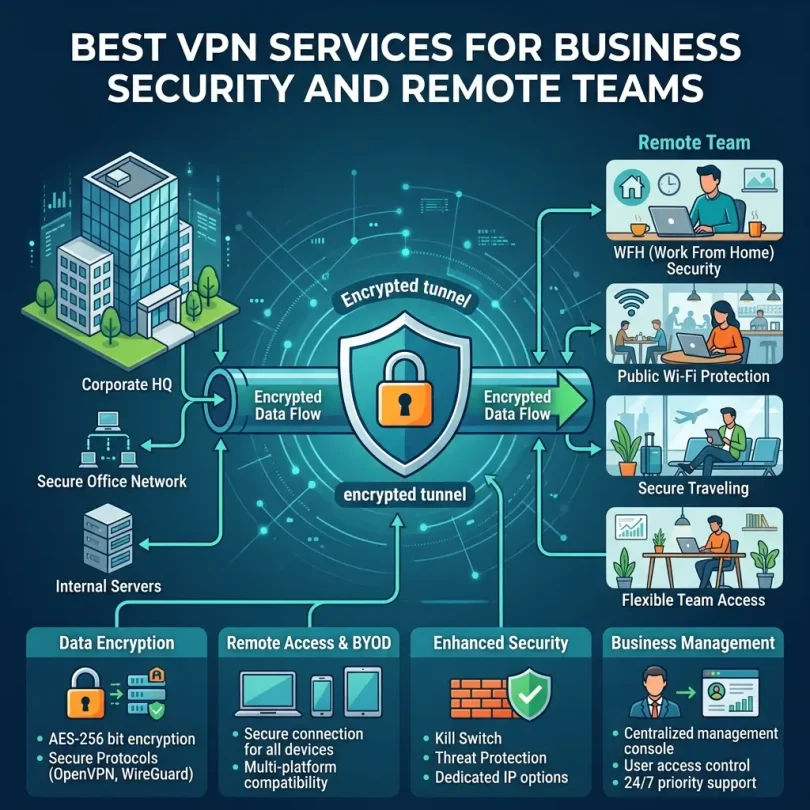
A business VPN helps create a more secure connection between the employee and the internet or company network. It encrypts traffic and can route users through a trusted gateway. This can help reduce risk when employees access sensitive business tools from outside the office.
VPNs are especially useful for teams that need to access internal dashboards, private servers, admin portals, development tools, shared drives, remote desktops, financial systems, or websites that should only allow trusted IP addresses.
Common Business Problems a VPN Can Help Solve
- Employees working on public Wi-Fi
- Remote access to private company systems
- Securing traffic for distributed teams
- Using dedicated business IP addresses
- Restricting admin panels to approved IPs
- Reducing exposure on unsafe networks
- Protecting remote workers during travel
- Supporting contractors and freelancers with controlled access
- Separating business access from personal browsing
- Improving control over remote work security
Business VPN vs Personal VPN: What Is the Difference?
A personal VPN is usually designed for one person. It may focus on privacy, public Wi-Fi security, location flexibility, and general browsing protection. Personal VPNs often have simple apps for phones, laptops, and browsers.
A business VPN is designed for teams. It usually includes admin management, centralized billing, user roles, dedicated IPs, access controls, activity logs, team onboarding, security policies, and support for multiple employees. Some business VPNs also support site-to-site connections, private gateways, identity provider integrations, single sign-on, and network segmentation.
For a business, team management is important. If an employee leaves, the company should be able to remove access quickly. If a contractor only needs access to one system, the company should be able to limit access. If a website admin panel should only accept traffic from one company IP, the VPN should support a dedicated IP or gateway.
VPN vs Zero Trust Network Access
Traditional VPNs often give users access to a network after connection. This can be useful, but it may also create risk if access is too broad. If an attacker steals VPN credentials, they may gain access to more resources than necessary.
Zero Trust Network Access, often called ZTNA, is a newer approach. Instead of trusting a user simply because they connected to a VPN, zero-trust access checks identity, device, location, policy, and application-level permissions. Users get access only to the specific apps or systems they need.
For small businesses, a simple business VPN may be enough. For growing companies, SaaS teams, regulated industries, and businesses with sensitive data, a zero-trust access platform may be safer and more scalable.
Simple Difference
- VPN: Creates an encrypted tunnel for remote access.
- Business VPN: Adds team management, dedicated gateways, and admin controls.
- ZTNA: Gives identity-based access to specific applications instead of broad network access.
What to Look for in a Business VPN
1. Strong Encryption
A business VPN should use modern encryption to protect traffic between employee devices and VPN servers. Strong encryption is especially important when employees use public Wi-Fi, travel frequently, or access sensitive company systems.
2. Team Management Dashboard
A business VPN should provide an admin dashboard where you can add users, remove users, assign permissions, view devices, manage billing, configure gateways, and enforce security policies. Without team management, a VPN becomes hard to control as the company grows.
3. Dedicated IP or Dedicated Gateway
Dedicated IP addresses are useful for businesses that need to whitelist company access. For example, a WordPress admin panel, hosting account, database, cloud dashboard, CRM, payment portal, or internal tool can be restricted to a trusted VPN IP.
4. Multi-Factor Authentication
MFA adds an extra layer of protection. Even if a password is stolen, the attacker still needs a second verification factor. A business VPN should support MFA, especially for admin users and remote teams handling sensitive data.
5. Single Sign-On Integration
SSO allows employees to log in using a central identity provider such as Google Workspace, Microsoft Entra ID, Okta, or other identity systems. This makes onboarding and offboarding easier and improves access control.
6. Device Compatibility
Check whether the VPN supports Windows, macOS, Linux, iOS, Android, browser extensions, routers, and servers. Remote teams often use mixed devices, so compatibility matters.
7. Access Policies
Good business VPNs and secure access platforms allow you to define who can access what. For example, sales staff may need CRM access, developers may need server access, and finance teams may need accounting tools. Not every employee needs access to every system.
8. Speed and Reliability
A slow VPN can frustrate employees and reduce productivity. Choose a provider with reliable servers, good uptime, multiple regions, and enough performance for video calls, SaaS apps, file transfers, remote desktops, and daily business work.
9. Logging and Privacy Policy
Businesses should review what data the VPN provider logs, how long logs are kept, and how the data is used. For business security, some admin logs may be helpful, but unnecessary personal browsing logs may create privacy concerns.
10. Customer Support
Remote access problems can stop employees from working. Good support matters, especially during onboarding, employee access issues, server configuration, dedicated IP setup, or emergency troubleshooting.
Best VPN Services for Business Security and Remote Teams: Detailed Reviews
1. NordLayer
Best for: Small and mid-sized businesses needing secure remote access
NordLayer is a business-focused secure access solution from the Nord Security ecosystem. It is designed for companies that need team VPN access, dedicated IPs, centralized management, secure remote connections, and stronger control over employee access.
For small businesses and remote teams, NordLayer is often easier to manage than building a VPN server from scratch. It can help teams secure public Wi-Fi connections, access cloud resources through dedicated gateways, and manage users from a central dashboard.
NordLayer is a strong option for agencies, ecommerce teams, SaaS startups, remote sales teams, customer support teams, and companies that need a practical business VPN without heavy enterprise complexity.
Key Features
- Business VPN and secure access tools
- Team management dashboard
- Dedicated IP and server options depending on plan
- Multi-factor authentication
- Cloud firewall and access controls depending on plan
- Device support for major platforms
- Centralized billing and user management
Pros
- Good fit for SMB remote teams
- Easier than self-hosting a VPN
- Dedicated IP options are useful for access control
- Business-focused admin management
- Strong brand recognition in VPN/security market
Cons
- Advanced features may require higher plans
- Not a complete replacement for all cybersecurity tools
- Businesses with complex internal networks may need expert setup
- Pricing should be checked based on users and gateways
Best Use Case
Choose NordLayer if your small or mid-sized business needs a practical business VPN with team management, dedicated IP options, and secure remote access for employees.
2. Perimeter 81
Best for: Modern business network security and zero-trust access
Perimeter 81 is a secure networking platform designed for businesses that need more than a simple VPN. It supports modern remote access, cloud network security, zero-trust-style access, user management, and secure connectivity for distributed teams.
It can be a strong fit for companies that have remote employees, cloud infrastructure, SaaS apps, private resources, and a need for identity-based security policies. Instead of giving broad network access, businesses can define more controlled access rules.
Perimeter 81 may be more advanced than what a very small team needs, but it can be valuable for growing businesses that want to modernize remote access.
Key Features
- Secure remote access
- Zero-trust network access features
- Cloud VPN and private gateways
- User and group-based policies
- Network segmentation
- Identity provider integrations
- Business admin dashboard
Pros
- More advanced than basic VPN tools
- Good for distributed teams
- Supports identity-based access policies
- Useful for businesses with cloud resources
- Can reduce broad network access risk
Cons
- May be more complex than a basic VPN
- Pricing may be higher than simple team VPNs
- Setup requires planning
- Small teams may not need every feature
Best Use Case
Choose Perimeter 81 if your business wants a modern secure access platform with VPN, zero-trust features, private gateways, and policy-based remote access.
3. Twingate
Best for: Modern VPN alternative for private application access
Twingate is a zero-trust-style remote access solution that works as an alternative to traditional VPN. Instead of connecting users broadly to a network, Twingate gives users access to specific private resources based on identity and policy.
This approach can be safer and easier to manage for modern cloud-first companies. For example, a developer can access a private server, a support team can access an internal dashboard, and a finance team can access accounting systems without giving everyone broad network access.
Twingate is especially useful for startups, SaaS companies, technical teams, and remote-first businesses that want secure access without the performance and management issues of traditional VPNs.
Key Features
- Zero-trust network access
- Application-level access controls
- Identity provider integrations
- Device posture checks depending on plan
- Secure private resource access
- Admin dashboard
- Cloud and on-premises resource support
Pros
- Modern alternative to traditional VPN
- Reduces broad network exposure
- Good for cloud-first teams
- Useful for developers and private apps
- Can improve remote access security
Cons
- Requires planning and technical setup
- May not fit users who only want simple browsing VPN
- Best value depends on private resource access needs
- Less familiar than traditional VPN for some teams
Best Use Case
Choose Twingate if your business wants secure access to private apps and internal resources without giving employees broad traditional VPN access.
4. Cloudflare Zero Trust
Best for: Scalable secure access, DNS filtering and web protection
Cloudflare Zero Trust is a broad security platform that can help businesses protect users, applications, networks, and internet access. It includes tools for identity-aware access, secure web gateway, DNS filtering, private network access, and application protection.
For businesses already using Cloudflare for DNS, CDN, or website security, Cloudflare Zero Trust can be a natural extension. It can help protect remote teams, secure internal apps, filter risky domains, and reduce dependence on traditional VPN models.
Cloudflare Zero Trust is powerful, but businesses should configure it carefully. It is best for teams that want a more complete secure access platform rather than a simple personal-style VPN.
Key Features
- Identity-aware access controls
- Private network access options
- Secure web gateway features
- DNS filtering
- Application protection
- Device client support
- Policy-based controls
- Integration with identity providers
Pros
- Powerful zero-trust platform
- Good for businesses using Cloudflare
- Supports secure access and web protection
- Can reduce traditional VPN dependency
- Scalable for growing teams
Cons
- Configuration can be technical
- Not simply a plug-and-play VPN for every team
- Requires policy planning
- Small teams may need help setting it up correctly
Best Use Case
Choose Cloudflare Zero Trust if your business wants secure application access, DNS filtering, web protection, and a scalable zero-trust security platform.
5. OpenVPN Access Server
Best for: Self-managed business VPN control
OpenVPN Access Server is a flexible VPN solution for businesses that want more control over their VPN deployment. It can be hosted on cloud infrastructure, on-premises servers, or virtual machines depending on the business setup.
This is a good option for technical teams that want to manage their own VPN server, configure access rules, control infrastructure, and avoid relying fully on a consumer-style VPN provider.
OpenVPN is widely known and widely supported, but self-managed VPN requires technical knowledge. Businesses must handle server security, updates, monitoring, backups, and access management properly.
Key Features
- Self-managed VPN server
- Secure remote access
- User management
- Cloud and on-premises deployment options
- Client apps for major platforms
- Access control features
- Flexible infrastructure control
Pros
- High level of control
- Good for technical teams
- Flexible deployment options
- Widely recognized VPN technology
- Can be customized for business needs
Cons
- Requires technical setup and maintenance
- Security is your responsibility
- Not as simple as managed business VPN tools
- Support and scaling depend on setup
Best Use Case
Choose OpenVPN Access Server if your business has technical resources and wants to host and control its own VPN infrastructure.
6. ExpressVPN for Teams
Best for: Easy team VPN management
ExpressVPN for Teams is designed for businesses that want a simple VPN experience with centralized management. It can be useful for small teams that need secure browsing, remote work protection, and easier team billing without building a custom VPN environment.
ExpressVPN is known as a consumer VPN brand, but team-focused options can make it more suitable for businesses that want simple deployment and broad device support.
Key Features
- Team VPN management
- Apps for major devices
- Encrypted connections
- Centralized billing
- Business user management
- Global server network
- Simple onboarding
Pros
- Easy for employees to use
- Strong consumer VPN reputation
- Good device support
- Useful for simple remote work protection
- Centralized team billing
Cons
- May not offer the same advanced access controls as ZTNA platforms
- Not ideal for complex private network access
- Dedicated business gateway features should be checked carefully
- Best for simple team VPN needs
Best Use Case
Choose ExpressVPN for Teams if your business wants a simple, user-friendly VPN for remote employees without complex network setup.
7. Surfshark for Business
Best for: Budget-conscious team VPN needs
Surfshark for Business can be a practical choice for small businesses and remote teams that want business VPN features without a high enterprise budget. It may offer team management, dedicated IP options, and secure connections for employees depending on the plan.
Surfshark can work well for teams that need public Wi-Fi protection, secure browsing, remote work privacy, and simple account management.
Key Features
- Business VPN plans
- Team dashboard
- Dedicated IP options depending on plan
- Device apps
- Encrypted traffic
- User management
- Centralized billing
Pros
- Budget-friendly business VPN option
- Simple for small teams
- Dedicated IP options can support access control
- Good for remote workers
- Easy onboarding compared with complex platforms
Cons
- May lack advanced enterprise access controls
- Not a full zero-trust platform
- Complex internal network access may need other tools
- Plan details should be reviewed carefully
Best Use Case
Choose Surfshark for Business if your team wants an affordable business VPN with simple management and secure remote work features.
8. Proton VPN for Business
Best for: Privacy-focused business VPN use
Proton VPN for Business is a privacy-focused VPN option from the Proton ecosystem. It can be useful for businesses that value secure internet access, privacy, and team-based VPN management.
Proton’s broader ecosystem includes secure email and other privacy-focused tools, which may appeal to businesses that want privacy-first communication and browsing protections.
Key Features
- Business VPN plans
- Privacy-focused VPN infrastructure
- Secure remote access
- Apps for major platforms
- Team management depending on plan
- Strong privacy positioning
- Integration with Proton ecosystem options
Pros
- Strong privacy reputation
- Good for security-conscious users
- Useful for remote workers
- Part of a privacy-focused product ecosystem
- Simple VPN experience
Cons
- May not replace advanced zero-trust platforms
- Business access-control features should be reviewed
- Not ideal for every complex internal network setup
- Some businesses may need dedicated gateway features
Best Use Case
Choose Proton VPN for Business if your company wants a privacy-focused VPN service for secure remote browsing and team protection.
9. GoodAccess
Best for: Small business cloud VPN and dedicated gateway access
GoodAccess is a business VPN and secure access platform built for small and mid-sized teams. It can provide cloud VPN gateways, dedicated IP addresses, access control, and simple team management.
This can be useful for businesses that need to whitelist access to admin panels, internal tools, development environments, databases, or cloud dashboards. Instead of employees connecting from random home IP addresses, they can connect through a trusted business gateway.
Key Features
- Cloud VPN gateway
- Dedicated IP options
- Team management
- Access control features
- Device apps
- Admin dashboard
- Small business-focused setup
Pros
- Good for small business private access
- Dedicated gateway is useful for IP whitelisting
- Simple compared with enterprise network tools
- Useful for remote teams and agencies
- Business-focused management
Cons
- May not be as well-known as larger VPN brands
- Advanced features depend on plan
- Complex enterprise networks may need stronger platforms
- Teams should review performance and server locations
Best Use Case
Choose GoodAccess if your small business needs cloud VPN, dedicated gateway access, and simple team management for remote workers.
10. Cisco Secure Client
Best for: Enterprise VPN and Cisco security ecosystem
Cisco Secure Client, formerly associated with Cisco AnyConnect, is used by many organizations for secure remote access. It is often part of a broader Cisco security and networking environment.
For small businesses, Cisco may be most useful when the company already uses Cisco firewalls, security appliances, or managed IT services. It can provide strong enterprise remote access, but it may be more complex than simpler business VPN tools.
Key Features
- Enterprise remote access VPN
- Integration with Cisco security tools
- Endpoint and network security features depending on setup
- Policy-based access
- Secure client software
- Support for managed IT environments
Pros
- Strong enterprise reputation
- Good for Cisco-based infrastructure
- Useful for managed IT security
- Supports serious remote access needs
- Can integrate with broader security stack
Cons
- May be too complex for very small teams
- Often requires IT expertise
- Not as simple as app-based business VPNs
- Best value depends on Cisco ecosystem
Best Use Case
Choose Cisco Secure Client if your business already uses Cisco networking or works with an IT provider that manages Cisco-based remote access.
11. Fortinet FortiClient
Best for: Businesses using Fortinet firewalls
Fortinet FortiClient is often used with Fortinet firewalls and security infrastructure to provide endpoint VPN and secure access. It can be valuable for businesses that already use FortiGate firewalls and want integrated remote access.
FortiClient can support VPN access, endpoint security features, and integration with Fortinet’s broader security fabric depending on deployment and licensing.
Key Features
- VPN client for remote access
- FortiGate firewall integration
- Endpoint security options
- Policy-based access
- Centralized management depending on setup
- Enterprise security ecosystem support
Pros
- Good for Fortinet environments
- Can integrate with firewall policies
- Useful for managed network security
- Supports business remote access
- Can combine VPN and endpoint security features
Cons
- Best fit requires Fortinet infrastructure
- May need IT or MSP support
- Not ideal as a simple standalone VPN for every small team
- Setup complexity depends on network design
Best Use Case
Choose Fortinet FortiClient if your business uses Fortinet firewalls and wants VPN access integrated into your existing security infrastructure.
12. Check Point Remote Access VPN
Best for: Enterprise secure remote access with Check Point security
Check Point Remote Access VPN is used by businesses that already rely on Check Point firewalls and security gateways. It provides secure remote access for employees connecting to corporate resources.
This option is usually better for businesses with existing Check Point infrastructure or managed security teams. It may be more than what a very small remote team needs, but it can be strong for companies with more formal network security requirements.
Key Features
- Secure remote access VPN
- Check Point gateway integration
- User authentication controls
- Policy-based access
- Enterprise security management
- Support for corporate network access
Pros
- Strong fit for Check Point users
- Enterprise security focus
- Policy-based access controls
- Useful for corporate remote access
- Can be managed as part of a broader security stack
Cons
- Requires security infrastructure knowledge
- Not a simple plug-and-play VPN for small teams
- Best value depends on Check Point ecosystem
- May require IT partner support
Best Use Case
Choose Check Point Remote Access VPN if your business already uses Check Point security gateways and needs enterprise-style remote access.
Best Business VPN by Use Case
Best VPN for Small Business Teams
NordLayer, GoodAccess, Surfshark for Business, ExpressVPN for Teams, and Proton VPN for Business are practical options for small teams that need secure remote browsing, team management, and easier setup.
Best VPN for Agencies
Agencies should consider NordLayer, GoodAccess, Twingate, Cloudflare Zero Trust, and Perimeter 81. Agencies often need dedicated IPs to access client dashboards, hosting panels, WordPress admin areas, ad accounts, and development environments securely.
Best VPN for Developers
Developers may prefer Twingate, OpenVPN Access Server, Cloudflare Zero Trust, DigitalOcean-hosted VPN setups, or business secure access platforms that allow private server access without exposing internal tools publicly.
Best VPN for Remote Employees
For general remote employees, NordLayer, ExpressVPN for Teams, Surfshark for Business, Proton VPN for Business, and GoodAccess can provide practical secure access. Companies with stronger security needs may choose Perimeter 81, Twingate, or Cloudflare Zero Trust.
Best VPN for Enterprise Environments
Cisco Secure Client, Fortinet FortiClient, Check Point Remote Access VPN, Perimeter 81, Cloudflare Zero Trust, and other enterprise security platforms are better suited for larger organizations or businesses with managed IT teams.
Best VPN Alternative for Zero Trust Access
Twingate, Cloudflare Zero Trust, and Perimeter 81 are strong options for businesses that want identity-based access and more granular control than a traditional VPN.
VPN Security Checklist for Businesses
Before choosing a business VPN, review this checklist:
- Does it support strong encryption?
- Does it have a business admin dashboard?
- Can you add and remove users easily?
- Does it support multi-factor authentication?
- Does it support dedicated IPs or gateways?
- Can you restrict access by user or group?
- Does it support your employees’ devices?
- Does it integrate with your identity provider?
- Can you review admin and access logs?
- Is customer support responsive?
- Are pricing and user limits clear?
- Does it support secure onboarding and offboarding?
- Can it scale as your team grows?
- Is the provider’s privacy policy clear?
- Does it fit your compliance requirements?
Business VPN Pricing: What to Know Before Buying
Business VPN pricing usually depends on the number of users, dedicated gateways, server locations, admin features, security controls, support level, and contract length. Some providers charge per user per month. Others charge extra for dedicated IPs, private gateways, advanced access policies, zero-trust features, or priority support.
Common VPN Pricing Factors
- Number of users
- Number of devices per user
- Dedicated IP addresses
- Private gateways
- Server locations
- Admin dashboard features
- SSO and identity integrations
- Multi-factor authentication
- Access logs and reporting
- Zero-trust controls
- Support level
- Monthly vs annual billing
Do not choose a business VPN only by the lowest monthly price. A cheap VPN may lack dedicated IPs, admin controls, reliable support, or access policies. For company use, management and security features can be more important than saving a few dollars per user.
Common Mistakes Businesses Make With VPNs
Mistake 1: Using Personal VPN Accounts for Employees
Personal VPN accounts do not give the company enough control. If employees use separate personal accounts, the business may struggle to manage access, remove users, enforce policies, or use dedicated company IPs.
Mistake 2: Not Enabling MFA
A VPN account should be protected with multi-factor authentication. Without MFA, stolen credentials can expose company systems.
Mistake 3: Giving Everyone Full Network Access
Not every employee needs access to every internal tool. Businesses should limit access based on job role. This reduces damage if an account is compromised.
Mistake 4: Ignoring Device Security
A VPN protects the connection, but it does not automatically secure an infected laptop. Businesses should also use endpoint protection, updates, device policies, and password managers.
Mistake 5: No Offboarding Process
When an employee or contractor leaves, VPN access should be removed immediately. Delayed offboarding creates unnecessary risk.
Mistake 6: Choosing VPN When ZTNA Is Better
Some businesses need more granular access than a traditional VPN provides. If your team needs access only to specific apps, a zero-trust access platform may be a better choice.
Mistake 7: Not Testing Speed
A VPN that slows down daily work can hurt productivity. Test speed, stability, video calls, file transfers, and app access before rolling it out to the whole team.
How to Choose the Best VPN for Your Business
Step 1: Define What You Need to Protect
List the systems employees access remotely. This may include email, CRM, hosting accounts, admin panels, databases, cloud storage, internal apps, remote desktops, financial tools, or development servers.
Step 2: Decide Between VPN and Zero Trust Access
If employees only need safer internet connections and a dedicated IP, a business VPN may be enough. If they need controlled access to private apps, servers, and internal tools, a zero-trust platform may be better.
Step 3: Count Users and Devices
Estimate how many employees, contractors, and devices need access. Include laptops, phones, tablets, and workstations.
Step 4: Check Dedicated IP Requirements
If you want to whitelist company access to admin panels, dashboards, hosting accounts, or servers, choose a VPN that supports dedicated IPs or private gateways.
Step 5: Review Security Controls
Look for MFA, SSO, access policies, user groups, logs, device controls, encryption, and admin permissions.
Step 6: Test Performance
Run a trial with a small group. Test speed, video calls, CRM access, remote desktop, file uploads, SaaS apps, and employee experience.
Step 7: Create Usage Rules
Define when employees must use the VPN, which systems require VPN access, how to report issues, and what happens when someone leaves the company.
Recommended VPN Setup for Small Businesses
A practical business VPN setup may include:
- Business VPN with centralized admin dashboard
- Dedicated IP or private gateway for sensitive systems
- MFA enabled for all users
- Role-based access rules
- Password manager for company credentials
- Endpoint protection on employee devices
- Secure cloud backup for business data
- Written onboarding and offboarding process
- Regular access review every quarter
This setup is not complicated, but it can significantly improve remote work security compared with employees connecting from random networks without protection.
Is a VPN Enough for Business Security?
No. A VPN is useful, but it is not a complete cybersecurity solution. It should be one layer in a broader security plan.
A complete small business security stack may include:
- Business VPN or zero-trust access
- Multi-factor authentication
- Password manager
- Endpoint protection
- Email security
- Cloud backup
- Employee security training
- Software updates
- Access control and offboarding
- Incident response plan
A VPN protects the connection, but it does not stop every phishing email, weak password, infected device, malicious insider, or accidental data leak. Businesses should combine VPN with identity security, endpoint protection, and good employee habits.
Final Recommendation
The best VPN service for business security and remote teams depends on how your employees work. NordLayer is a strong option for small and mid-sized businesses that need a practical business VPN with team management and dedicated IP options. GoodAccess is useful for small teams that need cloud VPN and dedicated gateway access. Surfshark for Business, ExpressVPN for Teams, and Proton VPN for Business can work for teams that want simpler VPN protection and centralized management. Perimeter 81, Twingate, and Cloudflare Zero Trust are better choices for companies that need modern secure access, identity-based policies, and zero-trust-style controls. OpenVPN Access Server is a good fit for technical teams that want to self-manage VPN infrastructure. Cisco Secure Client, Fortinet FortiClient, and Check Point Remote Access VPN are stronger fits for businesses already using those enterprise security ecosystems.
For most small businesses, the safest approach is to choose a business VPN, enable MFA, use a dedicated IP for sensitive systems, manage users from a central dashboard, and review access regularly. If your business is growing or handles sensitive data, consider moving toward zero-trust access instead of relying only on a traditional VPN.
A VPN will not solve every security problem, but it can make remote work safer, reduce exposure on public networks, and help businesses control access to important systems. Used correctly, it is a valuable layer in a modern business security strategy.
FAQs About Business VPN Services
What is the best VPN for business?
NordLayer, Perimeter 81, Twingate, Cloudflare Zero Trust, GoodAccess, OpenVPN Access Server, ExpressVPN for Teams, Surfshark for Business, Proton VPN for Business, Cisco Secure Client, and Fortinet FortiClient are all worth comparing. The best choice depends on team size, access needs, budget, and technical skill.
Do small businesses need a VPN?
Small businesses need a VPN if employees work remotely, use public Wi-Fi, access sensitive tools, manage admin dashboards, or need secure access to private company systems. A VPN is especially useful for remote and hybrid teams.
Is a business VPN different from a personal VPN?
Yes. A business VPN usually includes team management, admin controls, centralized billing, dedicated IPs, access policies, and user onboarding/offboarding features. A personal VPN is mainly designed for one individual.
What is a dedicated IP VPN?
A dedicated IP VPN gives your business a fixed IP address. This is useful for whitelisting access to admin panels, servers, cloud dashboards, and business tools so only trusted VPN traffic can connect.
Is VPN enough for remote work security?
No. A VPN is only one layer. Businesses should also use MFA, endpoint protection, password managers, email security, backups, software updates, and employee security training.
What is zero-trust access?
Zero-trust access is a security model where users are not automatically trusted. Access is based on identity, device, policy, and application permissions. It usually gives users access only to the specific resources they need.
Is zero trust better than VPN?
Zero trust can be better for businesses that need granular access control and stronger identity-based security. A traditional VPN may be enough for simpler secure browsing and remote access needs.
Can a VPN protect employees on public Wi-Fi?
Yes. A VPN can encrypt traffic when employees use public Wi-Fi in airports, hotels, cafes, or coworking spaces. However, employees should still avoid unsafe websites and use MFA for business accounts.
Should agencies use a VPN?
Yes. Agencies often manage client websites, ad accounts, hosting panels, analytics dashboards, and admin tools. A business VPN with dedicated IP can help secure access and reduce risk.
How much does a business VPN cost?
Business VPN pricing depends on users, devices, dedicated IPs, private gateways, server locations, admin controls, SSO, MFA, zero-trust features, and support level. Always compare the full cost, not just the starting price.