
Cybersecurity is no longer only a large-company problem. In 2026, small businesses also handle customer data, payment records, employee accounts, cloud apps, remote devices, invoices, contracts, and business emails. That means even a small shop, agency, clinic, online store, startup, consultancy, or local service company can become a target for phishing, ransomware, malware, password theft, business email compromise, and account takeover attacks.
The right cybersecurity software helps a small business protect laptops, desktops, servers, email accounts, cloud tools, passwords, remote workers, and sensitive files. But choosing the best cybersecurity software can be confusing because the market is full of similar terms: antivirus, endpoint protection, EDR, XDR, MDR, firewall, email security, identity protection, password manager, backup security, and cloud security.
This guide explains the best cybersecurity software options for small businesses in 2026, what each type of tool does, which features matter most, and how to choose a solution without overpaying for enterprise features you do not need.
Important note: This article is for general business technology guidance. Cybersecurity needs vary by company size, industry, device count, compliance requirements, and risk level. Before buying any solution, compare current pricing, supported devices, customer support, and contract terms directly with the vendor.
Quick Answer: What Is the Best Cybersecurity Software for a Small Business?
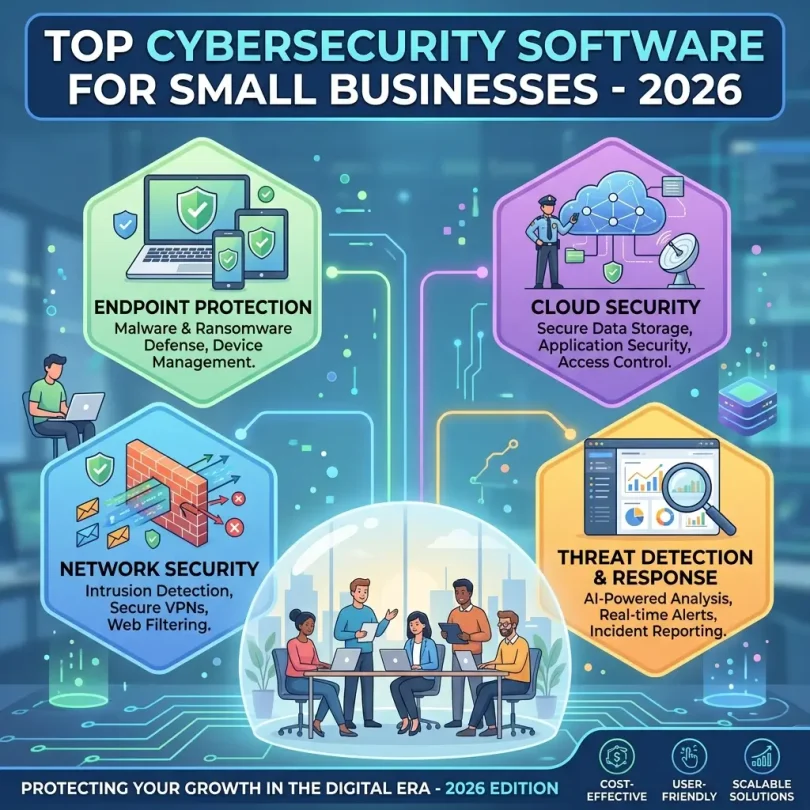
The best cybersecurity software for most small businesses is a layered security setup that includes endpoint protection, phishing protection, multi-factor authentication, password management, secure backup, and basic employee security training. A single antivirus tool is usually not enough for a business that uses cloud apps, remote employees, online payments, or customer data.
For many small businesses, a good starting point is a business-grade endpoint security platform such as Microsoft Defender for Business, Bitdefender GravityZone, ESET PROTECT, Sophos, CrowdStrike, SentinelOne, Malwarebytes ThreatDown, Avast Business, Cisco Secure Endpoint, Huntress, or Acronis Cyber Protect. The right choice depends on whether you want simple protection, advanced detection, managed response, or an all-in-one security and backup package.
Best Cybersecurity Software for Small Businesses in 2026: Comparison Table
| Software | Best For | Main Strength | Good Fit For |
|---|---|---|---|
| Microsoft Defender for Business | Microsoft 365 users | Endpoint protection, threat detection, Microsoft ecosystem integration | Small businesses already using Microsoft tools |
| Bitdefender GravityZone | Strong endpoint security | Malware protection, ransomware defense, policy control | Small teams needing reliable business security |
| ESET PROTECT | Lightweight protection | Low system impact, endpoint security, remote management | Businesses with mixed devices and limited IT resources |
| Sophos Intercept X | Ransomware protection | Endpoint detection, exploit prevention, managed options | Companies that want advanced security features |
| CrowdStrike Falcon | Advanced endpoint detection | Cloud-native EDR and threat intelligence | Growing companies with higher security needs |
| SentinelOne Singularity | Automated response | AI-based detection, endpoint visibility, rollback features | Teams that want modern EDR/XDR features |
| Malwarebytes ThreatDown | Simple business protection | Malware removal, endpoint protection, easier setup | Small businesses wanting straightforward security |
| Avast Business Security | Budget-conscious teams | Business antivirus, web protection, device security | Very small businesses needing basic protection |
| Cisco Secure Endpoint | Network-aware security | Endpoint protection with Cisco security ecosystem | Businesses already using Cisco products |
| Huntress | Managed detection and response | 24/7 monitoring, human-led threat detection, MDR support | Small businesses without an internal security team |
| Acronis Cyber Protect | Security plus backup | Endpoint protection, backup, recovery, anti-ransomware tools | Businesses that want protection and data recovery together |
Why Small Businesses Need Cybersecurity Software in 2026
Many small business owners think hackers only target banks, hospitals, government agencies, or large companies. In reality, small businesses can be easier targets because they often have fewer IT staff, weaker password policies, old software, unmanaged devices, and limited security monitoring.
A cyberattack can damage a small business in several ways. It can lock important files, steal customer data, stop daily operations, expose invoices and contracts, compromise business email accounts, damage reputation, or create legal and compliance problems. Even a short outage can cost money if the business depends on online orders, bookings, client communication, or cloud software.
Modern cybersecurity software is not just about blocking viruses. It helps detect suspicious behavior, stop ransomware, protect email accounts, manage device security, enforce policies, monitor threats, and help teams respond faster when something goes wrong.
What to Look for in Small Business Cybersecurity Software
1. Endpoint Protection
Endpoint protection secures devices such as laptops, desktops, workstations, and sometimes servers. For a small business, this is usually the most important cybersecurity layer because most attacks begin on a user device through a phishing email, malicious attachment, infected download, fake software update, or stolen password.
Good endpoint protection should include malware blocking, ransomware behavior detection, exploit protection, web threat protection, device control, and centralized management. Business-grade endpoint security is usually better than consumer antivirus because it gives the owner or IT manager more control over all company devices.
2. Ransomware Protection
Ransomware is one of the most serious threats for small businesses because it can encrypt files and stop operations. The best cybersecurity software should detect suspicious encryption behavior, block malicious scripts, monitor file changes, and provide fast response options.
However, no security tool should be treated as a complete guarantee against ransomware. A safer approach is to combine endpoint security with secure backups, multi-factor authentication, restricted admin access, software updates, and employee training.
3. Email and Phishing Protection
Phishing is still one of the most common ways attackers enter a business. A phishing email may look like a bank alert, delivery message, invoice request, password reset, Microsoft 365 notification, Google Workspace alert, payroll message, or supplier email.
Small businesses should look for security tools that can detect suspicious links, block malicious attachments, protect email accounts, and warn users about fake login pages. If your company uses Microsoft 365 or Google Workspace, email security should be part of your buying decision.
4. Multi-Factor Authentication Support
Multi-factor authentication, also called MFA or 2FA, adds another layer of protection beyond a password. Even if a password is stolen, MFA can make it harder for attackers to access email, cloud storage, admin dashboards, CRM systems, and business apps.
For stronger protection, businesses should use app-based MFA, hardware security keys, or phishing-resistant authentication where possible. SMS-based codes are better than no MFA, but they are not the strongest option for sensitive business accounts.
5. EDR and MDR Features
EDR means endpoint detection and response. It helps detect suspicious activity after a threat enters a device. Instead of only blocking known malware, EDR looks for unusual behavior such as credential theft, suspicious PowerShell activity, privilege escalation, lateral movement, or ransomware-like file changes.
MDR means managed detection and response. This is useful when a small business does not have a full-time cybersecurity team. With MDR, security experts monitor alerts, investigate threats, and help respond to incidents.
For a small business with no IT department, MDR can be more useful than a complex EDR dashboard that nobody checks.
6. Cloud and SaaS Protection
Many small businesses now use cloud tools such as Microsoft 365, Google Workspace, Dropbox, Slack, Zoom, HubSpot, Salesforce, QuickBooks, Shopify, WordPress, and project management software. Cybersecurity software should fit this reality.
Look for tools that help protect cloud accounts, detect suspicious logins, support identity security, and integrate with the apps your business already uses.
7. Centralized Dashboard
A business security product should not require you to check every laptop manually. A centralized dashboard helps you see device status, alerts, updates, blocked threats, policy settings, and security recommendations in one place.
This is especially important for remote teams, agencies, consultants, ecommerce stores, and businesses where employees work from different locations.
8. Easy Setup and Support
The best cybersecurity software for a small business is not always the most advanced tool. It is the tool your team can actually install, manage, and maintain. A product with excellent protection but confusing setup may not be practical for a business with no IT department.
Check whether the vendor offers guided setup, live support, onboarding help, documentation, managed service provider options, and simple policy templates.
Best Cybersecurity Software for Small Businesses: Detailed Reviews
1. Microsoft Defender for Business
Best for: Small businesses using Microsoft 365
Microsoft Defender for Business is a strong option for small and medium-sized businesses that already use Microsoft 365, Windows devices, Outlook, Teams, SharePoint, and OneDrive. It is designed for smaller organizations and offers business-grade endpoint security without requiring the complexity of a full enterprise security stack.
Its main value is integration. If your business already works inside the Microsoft ecosystem, Defender for Business can reduce tool overload and give you endpoint protection, threat detection, attack surface reduction, and security recommendations in a familiar environment.
It is especially useful for companies that want to protect Windows laptops, manage device security, and reduce ransomware and malware risk. Some businesses may also use it together with Microsoft 365 Business Premium, depending on their license needs.
Key Features
- Endpoint protection for business devices
- Threat and vulnerability management
- Attack surface reduction controls
- Endpoint detection and response features
- Automated investigation and response
- Integration with Microsoft 365 security tools
Pros
- Good fit for Microsoft-based businesses
- Business-focused endpoint security
- Strong integration with Windows and Microsoft 365
- Useful for companies with up to a few hundred users
Cons
- May be less attractive for businesses not using Microsoft tools
- Some features may require the right Microsoft license
- Configuration can still require technical understanding
Best Use Case
Choose Microsoft Defender for Business if your small business already uses Microsoft 365 and wants business-grade endpoint security without adding too many separate vendors.
2. Bitdefender GravityZone
Best for: Strong endpoint protection and ransomware defense
Bitdefender GravityZone is a popular business cybersecurity platform known for endpoint protection, malware defense, ransomware protection, and centralized management. It is suitable for small businesses that want reliable protection across company devices without building a large internal security operation.
GravityZone can work well for companies with office devices, remote employees, and mixed security needs. It gives administrators control over security policies and visibility into protected endpoints.
Key Features
- Business endpoint protection
- Malware and ransomware defense
- Web threat protection
- Centralized security console
- Device and policy management
- Optional advanced security layers depending on plan
Pros
- Strong malware protection reputation
- Good for small and mid-sized businesses
- Centralized dashboard for managing devices
- Flexible product options
Cons
- Plan selection may feel confusing for beginners
- Advanced features can increase cost
- May require setup time for best policy configuration
Best Use Case
Choose Bitdefender GravityZone if you want strong endpoint protection for multiple business devices and need a balance of security, control, and scalability.
3. ESET PROTECT
Best for: Lightweight business security
ESET PROTECT is a good option for small businesses that want reliable endpoint protection with a lighter system impact. It is often considered by companies that need security software that does not slow down laptops or disrupt daily work.
ESET offers business-focused protection, remote management, malware defense, and multiple security plan options. It can be a practical choice for small teams, service companies, agencies, and businesses that need straightforward device protection.
Key Features
- Endpoint antivirus and anti-malware
- Remote device management
- Web and email threat protection
- Cloud-based console options
- Ransomware and exploit protection features
Pros
- Lightweight performance
- Good for small teams
- Remote management options
- Suitable for businesses with limited IT resources
Cons
- Advanced features depend on plan
- May not be as full-service as MDR-focused vendors
- Some businesses may need extra email or identity security tools
Best Use Case
Choose ESET PROTECT if your business wants dependable endpoint protection with a clean management experience and low device performance impact.
4. Sophos Intercept X
Best for: Ransomware and exploit protection
Sophos Intercept X is designed for businesses that want stronger endpoint protection, ransomware defense, exploit prevention, and optional managed security services. Sophos is a strong choice for companies that need more than basic antivirus but do not want to build a complete security operations center.
Sophos also offers managed detection and response options, which can be useful for businesses without dedicated cybersecurity staff.
Key Features
- Endpoint protection
- Ransomware protection
- Exploit prevention
- Threat detection and response
- Managed detection and response options
- Centralized cloud management
Pros
- Strong anti-ransomware focus
- Good managed service options
- Useful for businesses with higher risk exposure
- Centralized management
Cons
- May cost more than basic antivirus
- Some advanced features may be more than a very small business needs
- Best value depends on correct plan selection
Best Use Case
Choose Sophos Intercept X if ransomware protection, exploit prevention, and managed response options are important to your business.
5. CrowdStrike Falcon
Best for: Advanced endpoint detection and growing businesses
CrowdStrike Falcon is a cloud-native cybersecurity platform known for endpoint detection and response, threat intelligence, and modern security operations. While it is often used by larger organizations, growing small businesses with higher risk levels may also consider CrowdStrike if they need advanced endpoint visibility.
It may be a strong fit for technology companies, professional services firms, financial service providers, healthcare-related businesses, or any company where data security is a top priority.
Key Features
- Cloud-native endpoint protection
- EDR capabilities
- Threat intelligence
- Behavior-based detection
- Managed options depending on plan
- Scalable security platform
Pros
- Strong advanced detection capabilities
- Cloud-based deployment
- Good for growing teams
- Useful for businesses that need deeper visibility
Cons
- May be more advanced than a very small team needs
- Pricing can be higher than basic endpoint tools
- Requires someone to understand and act on alerts unless managed service is included
Best Use Case
Choose CrowdStrike if your business has higher security requirements, sensitive data, remote endpoints, or a need for advanced EDR-style protection.
6. SentinelOne Singularity
Best for: Automated threat response and modern endpoint security
SentinelOne Singularity is another modern cybersecurity platform focused on endpoint protection, detection, response, automation, and visibility. It is often considered by businesses that want AI-assisted detection and automated response features.
For small businesses, SentinelOne can be useful when security threats need to be detected quickly and handled with less manual work. However, like other advanced platforms, the best value depends on whether your team can manage it or whether you buy it through a managed provider.
Key Features
- Endpoint protection
- AI-based threat detection
- Automated response
- Ransomware behavior detection
- Rollback and remediation features depending on plan
- Visibility across endpoints and workloads
Pros
- Strong automation features
- Modern EDR/XDR approach
- Useful ransomware response capabilities
- Good for businesses wanting advanced protection
Cons
- Can be complex for non-technical users
- May be better through an MSP or security partner
- Advanced plans can increase cost
Best Use Case
Choose SentinelOne if your small business wants modern endpoint detection, automated response, and stronger visibility than basic antivirus can provide.
7. Malwarebytes ThreatDown
Best for: Simple and practical business protection
Malwarebytes ThreatDown is suitable for small businesses that want business-focused malware protection without a complicated setup. Malwarebytes has a strong brand reputation among users who want malware removal and straightforward endpoint protection.
For very small businesses, local offices, freelancers with client data, or teams that need basic protection across a few devices, ThreatDown can be easier to understand than enterprise-heavy platforms.
Key Features
- Endpoint protection
- Malware detection and removal
- Web protection
- Threat prevention
- Centralized business management options
Pros
- Simple user experience
- Good for smaller teams
- Recognizable security brand
- Practical malware protection
Cons
- May not offer the same depth as advanced EDR platforms
- Businesses with high compliance needs may require more layers
- May need additional email security and identity protection
Best Use Case
Choose Malwarebytes ThreatDown if your business wants simple endpoint protection and malware defense without a heavy security stack.
8. Avast Business Security
Best for: Small teams looking for affordable business antivirus
Avast Business Security can be a practical choice for very small businesses that need affordable antivirus-style protection, web threat blocking, and device security. It is more suitable for companies looking for basic business protection rather than advanced EDR or MDR.
This can include small offices, local service providers, solo consultants, and teams that mainly need to protect laptops and desktops from common threats.
Key Features
- Business antivirus
- Malware protection
- Web and email shield features
- Device protection
- Centralized management depending on plan
Pros
- Budget-friendly option
- Easy for smaller teams to understand
- Useful for basic endpoint security
- Good starting point for very small companies
Cons
- Not the strongest option for advanced threats
- May not be enough for regulated industries
- Businesses may need extra backup, MFA, and email security tools
Best Use Case
Choose Avast Business Security if your business needs affordable business antivirus and basic protection for a small number of devices.
9. Cisco Secure Endpoint
Best for: Businesses using Cisco security or networking products
Cisco Secure Endpoint is a strong option for businesses that already use Cisco networking, firewall, or security products. It provides endpoint protection and helps connect endpoint activity with broader security visibility.
For small businesses, Cisco may be most useful when there is already an IT provider, managed service provider, or Cisco partner involved. The product can be powerful, but very small teams may prefer a simpler option unless they already have Cisco expertise.
Key Features
- Endpoint protection
- Threat detection and response
- Cloud-based security analytics
- Integration with Cisco security ecosystem
- Device and threat visibility
Pros
- Strong ecosystem for Cisco users
- Good threat visibility
- Suitable for businesses with managed IT support
- Can fit into broader network security strategy
Cons
- May be too complex for non-technical owners
- Best value often comes with Cisco ecosystem integration
- Pricing and setup may require partner support
Best Use Case
Choose Cisco Secure Endpoint if your company already uses Cisco products or works with a managed IT provider that supports Cisco security.
10. Huntress
Best for: Managed detection and response for small businesses
Huntress is different from a traditional antivirus tool because it focuses heavily on managed detection and response. This means it is designed for businesses that need expert monitoring and response support, especially when they do not have an internal cybersecurity team.
Small businesses often cannot afford a full-time security operations center. Huntress helps fill that gap by combining technology with human threat analysts. It can be especially useful for companies that want protection against ransomware, phishing-related compromise, business email threats, and suspicious endpoint activity.
Key Features
- Managed endpoint detection and response
- Human-led threat analysis
- Identity threat detection options
- Security awareness training options
- 24/7 monitoring depending on plan and provider setup
- MSP-friendly deployment
Pros
- Excellent fit for businesses without security staff
- Managed response approach
- Strong small business focus
- Can reduce alert overload
Cons
- Usually works best through MSPs or security partners
- Not a simple consumer-style antivirus product
- May need to be combined with other layers depending on needs
Best Use Case
Choose Huntress if your small business wants security monitoring and response help instead of only installing software and hoping someone checks the alerts.
11. Acronis Cyber Protect
Best for: Businesses that want cybersecurity and backup together
Acronis Cyber Protect combines cybersecurity features with backup and recovery tools. This makes it attractive for small businesses that worry about ransomware, accidental deletion, hardware failure, and data loss.
Many cyber incidents become worse because the business does not have clean, reliable backups. Acronis can be useful for companies that want endpoint protection and business continuity in the same ecosystem.
Key Features
- Endpoint protection
- Backup and recovery
- Anti-ransomware features
- Patch management options
- Device and workload protection
- Cloud-based management
Pros
- Combines security and backup
- Good for ransomware recovery planning
- Useful for businesses with critical files
- Can reduce the number of separate tools
Cons
- Pricing and plans can be complex
- May include more features than some small teams need
- Backup strategy still requires proper configuration and testing
Best Use Case
Choose Acronis Cyber Protect if your business wants cybersecurity, backup, and recovery planning in one solution.
Best Cybersecurity Software by Business Type
Best for Small Offices
Small offices with 5 to 25 employees usually need endpoint protection, email protection, MFA, password management, and secure backup. Microsoft Defender for Business, Bitdefender GravityZone, ESET PROTECT, Malwarebytes ThreatDown, and Avast Business can all be practical options depending on budget and technical comfort.
Best for Remote Teams
Remote teams need stronger endpoint visibility, secure login controls, cloud account protection, and password management. Microsoft Defender for Business, CrowdStrike, SentinelOne, Sophos, and Huntress may be better fits for distributed teams because remote devices are harder to monitor manually.
Best for Agencies and Consultants
Agencies handle client files, ad accounts, website credentials, analytics access, contracts, and invoices. A good setup should include endpoint security, password managers, MFA, secure file sharing, and backup. Bitdefender, ESET, Microsoft Defender, Sophos, and Acronis can be strong options.
Best for Ecommerce Businesses
Ecommerce businesses should protect admin dashboards, payment-related systems, customer data, email accounts, WordPress or Shopify access, and employee devices. Cybersecurity software should be combined with strong passwords, MFA, fraud monitoring, secure hosting, plugin updates, and backup.
Best for Healthcare, Legal, and Financial Services
Businesses that handle sensitive client data may need stronger security, audit logs, encryption, compliance support, and managed response. CrowdStrike, SentinelOne, Sophos MDR, Microsoft security tools, Huntress, and Cisco Secure Endpoint may be worth reviewing with a professional IT or compliance advisor.
Cybersecurity Software vs Antivirus: What Is the Difference?
Antivirus software usually focuses on detecting and blocking known malware. It is useful, but it is only one part of modern business security.
Cybersecurity software for businesses can include antivirus, endpoint protection, EDR, ransomware defense, phishing protection, vulnerability management, device control, cloud security, identity protection, backup, and managed response.
For a home user, antivirus may be enough. For a business, especially one with employees, customer records, online payments, remote work, or cloud apps, business-grade cybersecurity software is usually a better choice.
How Much Does Cybersecurity Software Cost for a Small Business?
Cybersecurity software pricing depends on the vendor, number of users, number of devices, features, contract length, and support level. Basic business antivirus is usually cheaper, while advanced EDR, MDR, XDR, and managed security services cost more.
Small businesses should not choose only by price. A cheap tool that nobody manages may cost more in the long run if an attack causes downtime or data loss. At the same time, a very advanced enterprise product may be wasteful if the business has no one to manage it.
The smarter approach is to compare:
- Cost per user or device
- Endpoint protection features
- Ransomware protection
- Email security options
- MFA and identity security support
- Backup and recovery features
- Customer support quality
- Ease of setup
- Managed service availability
- Contract terms and cancellation policy
Minimum Cybersecurity Stack for a Small Business in 2026
If your business cannot buy every tool at once, start with a practical security stack. The goal is not perfection. The goal is to reduce the biggest risks first.
1. Business Endpoint Security
Install business-grade endpoint protection on every company laptop, desktop, and server. Avoid leaving employee devices unmanaged.
2. Multi-Factor Authentication
Enable MFA for email, cloud storage, accounting software, CRM, admin dashboards, hosting accounts, domain registrar accounts, and payment systems.
3. Password Manager
Use a business password manager so employees do not reuse weak passwords or share credentials through chat messages and spreadsheets.
4. Secure Backup
Back up important files, databases, website data, invoices, contracts, and customer records. Test recovery regularly. A backup that cannot be restored is not a reliable backup.
5. Email Security
Add phishing protection and train employees to recognize fake invoices, login pages, delivery alerts, and urgent payment requests.
6. Software Updates
Keep operating systems, browsers, plugins, business apps, website CMS, and security tools updated. Many attacks use known vulnerabilities that already have patches available.
7. Employee Training
Even the best cybersecurity software cannot stop every mistake. Basic training helps employees avoid phishing links, suspicious attachments, password reuse, fake support calls, and unsafe downloads.
Common Mistakes Small Businesses Make When Buying Cybersecurity Software
Mistake 1: Buying Consumer Antivirus for Business Devices
Consumer antivirus may protect one device, but it usually does not give business-level management, reporting, policy control, or centralized visibility. A small business should use business-grade protection whenever possible.
Mistake 2: Ignoring Email Security
Many attacks start with email. If your cybersecurity plan only protects laptops but ignores email accounts, your business still has a major weak point.
Mistake 3: Not Using MFA
Password theft is common. Without MFA, one stolen password can expose email, cloud files, CRM data, website admin panels, and payment accounts.
Mistake 4: No Backup Plan
Cybersecurity software reduces risk, but backup helps recovery. Businesses should keep secure backups and test them regularly.
Mistake 5: Choosing the Most Complicated Tool
Advanced security software is only helpful if someone can manage it. If your team has no IT staff, consider a simpler platform or a managed detection and response provider.
Mistake 6: Protecting Only Office Devices
Remote laptops, personal devices used for work, contractor access, and mobile devices can also create risk. A business should define which devices are allowed to access company systems.
How to Choose the Best Cybersecurity Software for Your Business
Step 1: Count Your Devices and Users
Make a list of laptops, desktops, servers, mobile devices, and user accounts. Many businesses underestimate how many devices and logins they actually need to protect.
Step 2: Identify Your Most Important Data
Decide what data would hurt the most if lost or exposed. This may include customer records, payment data, employee files, contracts, business emails, website databases, source code, financial documents, or client files.
Step 3: Match Software to Risk Level
A small local business may need simple endpoint security, MFA, password management, and backup. A healthcare, legal, finance, SaaS, or ecommerce business may need stronger EDR, MDR, compliance support, and cloud security.
Step 4: Check Ease of Management
Ask who will manage alerts, updates, policies, and incidents. If nobody in your company has time or skill to do this, choose a managed service or a simpler product.
Step 5: Compare Support Options
Cybersecurity support matters during emergencies. Check whether the vendor offers live chat, phone support, onboarding, documentation, partner support, or managed response.
Step 6: Start With a Trial or Demo
Before committing to a long contract, test the dashboard, installation process, device performance, alert quality, and reporting. A product that looks good on paper may not fit your daily workflow.
Final Recommendation
The best cybersecurity software for small businesses in 2026 depends on your business size, tools, risk level, and budget. For many Microsoft-based small businesses, Microsoft Defender for Business is a strong starting point. For reliable endpoint security, Bitdefender GravityZone and ESET PROTECT are worth comparing. For stronger ransomware and managed response needs, Sophos, Huntress, CrowdStrike, and SentinelOne may be better choices. For businesses that want security and backup together, Acronis Cyber Protect is a practical option.
If you are a very small business, do not wait for a perfect enterprise-level setup. Start with the basics: business endpoint security, MFA, password management, secure backup, email protection, and employee training. These layers can reduce common risks and make your business much harder to compromise.
Cybersecurity is not a one-time purchase. It is an ongoing business habit. The right software gives your company better protection, but the best results come when software, people, policies, and backup planning work together.
FAQs About Cybersecurity Software for Small Businesses
What is the best cybersecurity software for a small business?
The best cybersecurity software depends on your needs. Microsoft Defender for Business is strong for Microsoft 365 users. Bitdefender GravityZone and ESET PROTECT are good endpoint security choices. Sophos, CrowdStrike, SentinelOne, and Huntress are better for businesses needing advanced detection or managed response.
Is antivirus enough for a small business?
Basic antivirus is better than no protection, but it is usually not enough for a business. Small businesses should also use MFA, email protection, password management, secure backup, software updates, and employee training.
What is endpoint protection?
Endpoint protection secures business devices such as laptops, desktops, and servers. It helps block malware, ransomware, suspicious behavior, malicious websites, and other threats that target company devices.
What is EDR?
EDR means endpoint detection and response. It monitors devices for suspicious activity and helps detect threats that traditional antivirus might miss. EDR is useful for businesses that need deeper visibility and faster response.
What is MDR?
MDR means managed detection and response. It combines security technology with human experts who monitor alerts and help respond to threats. MDR is useful for small businesses without a dedicated cybersecurity team.
Do small businesses need ransomware protection?
Yes. Ransomware can lock files, stop operations, and cause serious business disruption. Small businesses should use endpoint protection, backup, MFA, email security, and employee training to reduce ransomware risk.
How can a small business protect email accounts?
Use strong passwords, multi-factor authentication, phishing protection, spam filtering, secure email settings, and employee training. Business owners should also monitor suspicious login alerts and avoid sharing passwords.
Should a small business use free cybersecurity software?
Free tools can help in limited cases, but they usually lack business management, centralized dashboards, support, policy controls, and advanced protection. For company devices and customer data, business-grade software is usually a better choice.
What is the most important cybersecurity feature for small businesses?
The most important features are endpoint protection, MFA, email security, ransomware protection, backup, and easy management. No single feature is enough by itself. A layered approach is safer.
How often should small businesses review cybersecurity tools?
Small businesses should review cybersecurity tools at least once a year, or whenever they add employees, change cloud apps, start remote work, collect more customer data, or face new compliance requirements.